

Subscription Plans
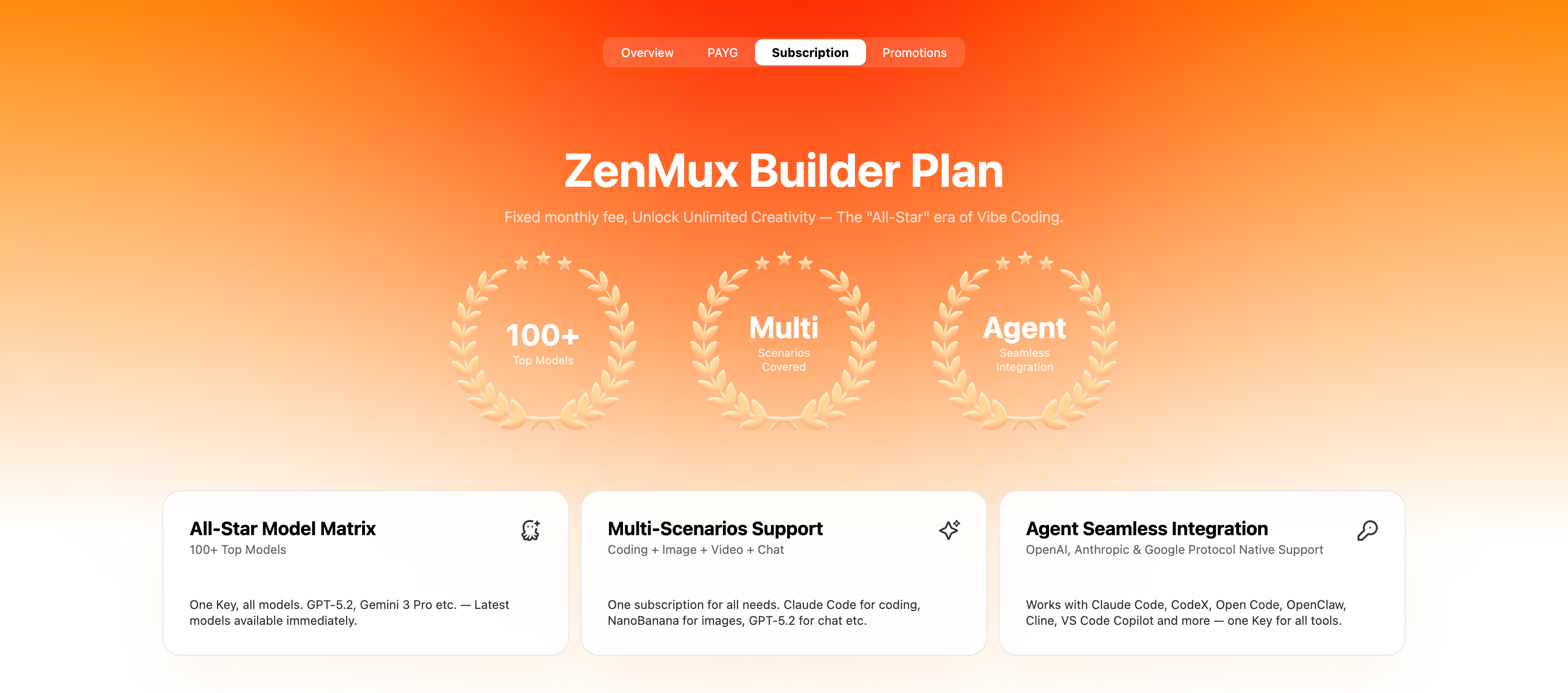
The 开桥 订阅计划 gives individual developers a fixed monthly fee and predictable access to AI models. A single subscription lets you tap into the world's top models, so you can focus on building instead of worrying about the cost of every API call.
Plan Overview
The 订阅计划 comes in four tiers. The main differences are quota size and model coverage.
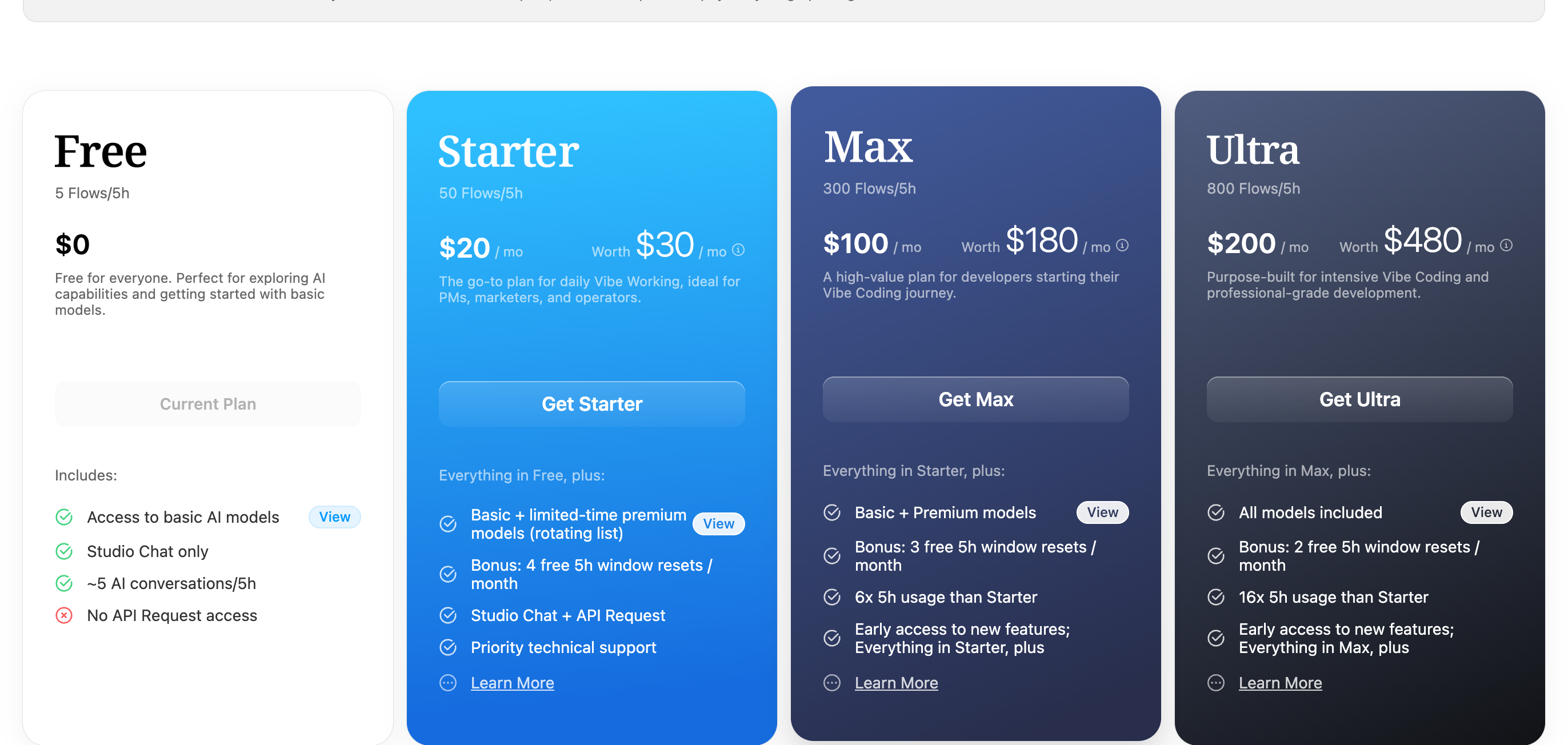
| Plan | Monthly fee | 5-hour quota | Model coverage | Bonus window resets | API access |
|---|---|---|---|---|---|
| Free | $0 | 5 Flows | Basic models | — | ❌ Studio Chat only |
| Starter | $20/mo | 50 Flows | Basic models + limited-time premium models | 4 / month | ✅ |
| Max | $100/mo | 300 Flows | Basic + premium models | 3 / month | ✅ |
| Ultra | $200/mo | 800 Flows | All models | 2 / month | ✅ |
The Free plan does not support API calls
The Free plan can only be used in Studio Chat on the web (roughly 5 conversations per 5 hours) and provides no API Request access. To call models with an API Key from tools like Claude Code, Cursor, or CodeX, choose Starter or above.
Limited spots
The top of the pricing page shows SPOTS REMAINING. The 订阅计划 is currently released in limited batches — once spots sell out, you'll need to wait for the next batch.
Viewing the models included in a plan
The 开桥 model list changes continuously: new models launch, limited-time premium models rotate in and out, and some models move between plans — always treat the pricing page as the source of truth.
Look up the live list in three steps
Step 1 — Open the subscription pricing page and scroll down to the plan cards
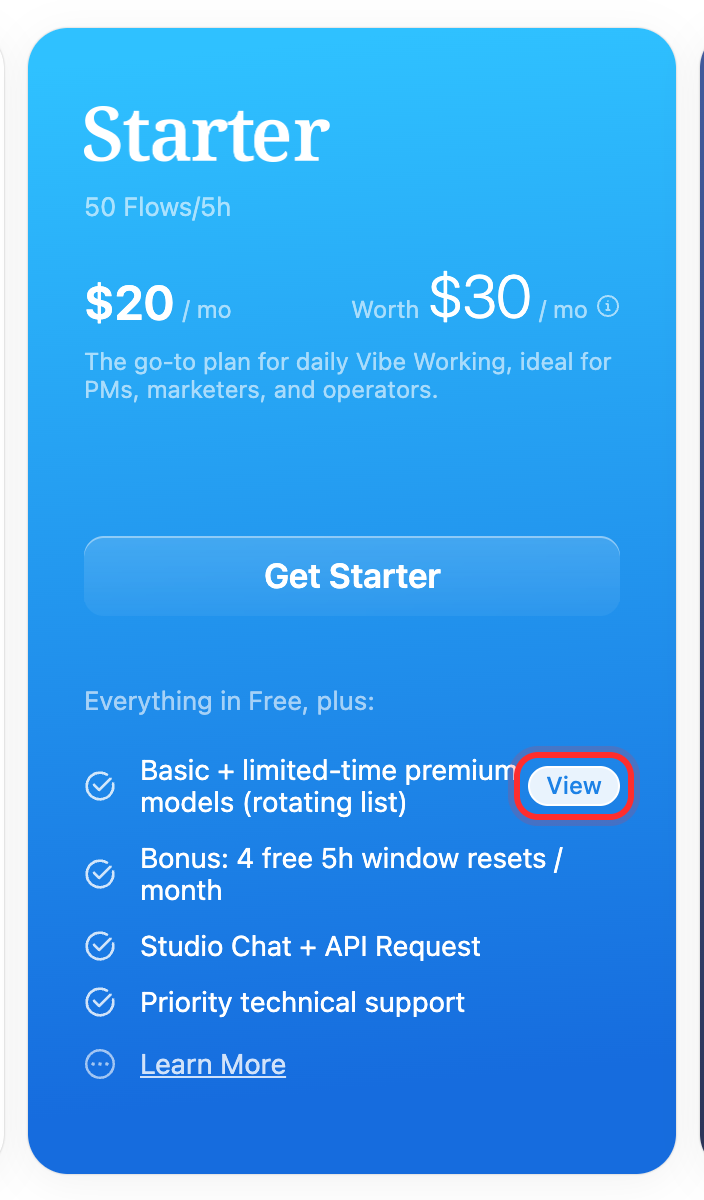
Step 2 — 点击the View button on the plan card
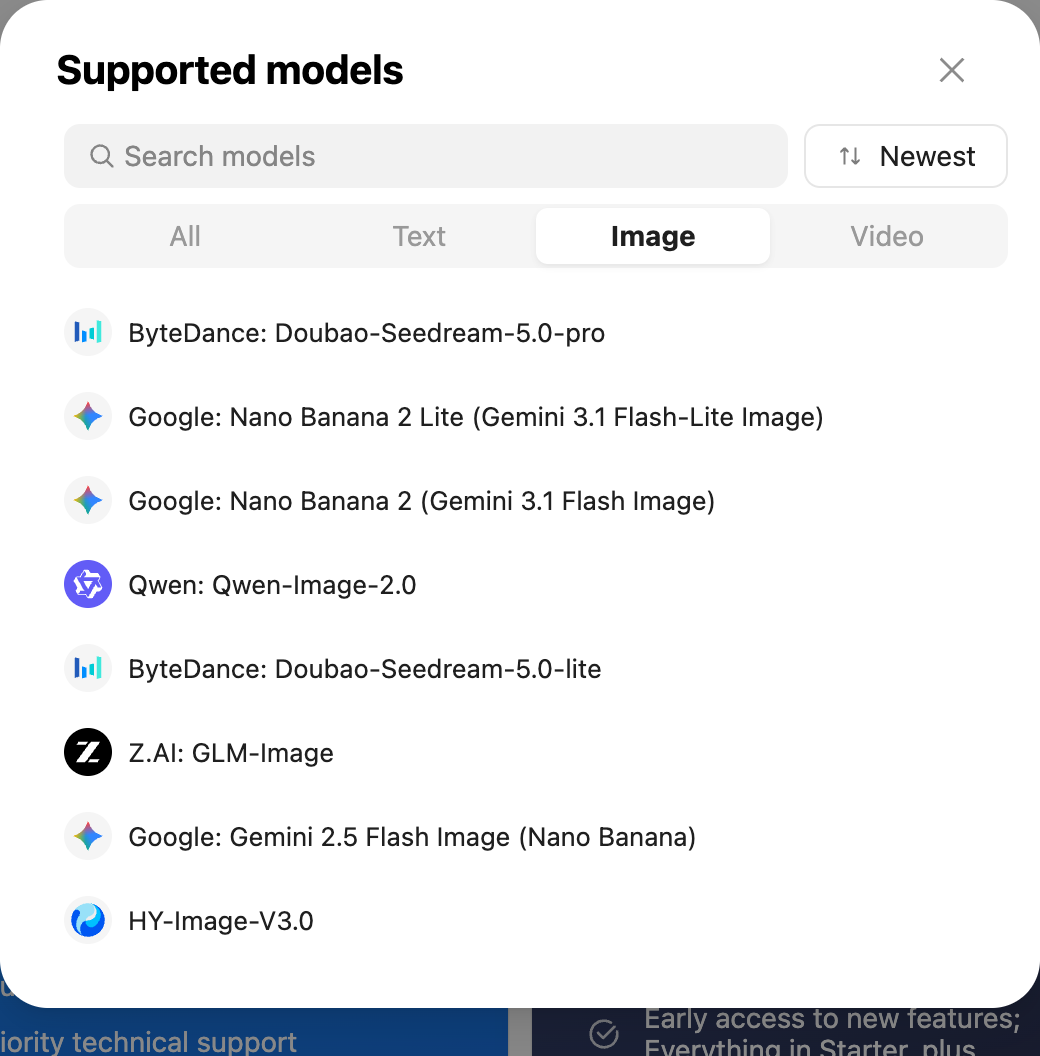
Step 3 — Review the full list in the Supported models dialog
What the model badges mean
Some models in the list carry badges such as Limited-Time Offer (available for a limited period), Free (free model), Rate Limit (subject to an additional rate limit), and PAYG Only (available on pay-as-you-go only). Badges change with platform policy, so treat what's shown on the page as authoritative.
Plan details
The sections below describe how each plan is positioned and what its model coverage looks like. For the exact model list, use the View button on the corresponding card — this section deliberately does not name individual models.
Free — Try it out
For users getting to know 开桥, offering a zero-cost way to explore the platform's AI capabilities.
- Quota — 5 Flows per 5 hours (roughly 5 conversations)
- Model coverage — Basic models
- How to use it — Studio Chat on the web only; no API access
Starter — The everyday choice
The go-to plan for daily Vibe Working, well suited to product managers, marketers, operators, and lighter development work.
- Quota — 50 Flows per 5 hours
- Model coverage — Basic models plus premium models on a rotating, limited-time basis
- Plan benefits — Studio Chat and API access, 4 bonus window resets per month, priority technical support
Limited-time models rotate
Starter's premium model list works on a rotating, limited-time basis and is refreshed periodically. Before subscribing, click View on the card to confirm the model you depend on is currently included. If that model is essential to your workflow, choose Max or Ultra instead.
Max — High-intensity development
A high-value plan for developers starting their Vibe Coding journey.
- Quota — 300 Flows per 5 hours (6× Starter)
- Model coverage — Basic plus premium models, covering the vast majority of mainstream flagship models
- Plan benefits — 3 bonus window resets per month, early access to new features, and everything in Starter
Ultra — Professional-grade flagship
Purpose-built for intensive Vibe Coding and professional-grade development.
- Quota — 800 Flows per 5 hours (16× Starter)
- Model coverage — All models
- Plan benefits — 2 bonus window resets per month, early access to new features, and everything in Max
Choosing between Max and Ultra
Max and Ultra currently cover nearly identical model lists. The real difference is quota size (800 vs 300 Flows per 5 hours), not model selection.
- If usage is your bottleneck (you regularly hit the 5-hour limit) → choose Ultra
- If model selection is your only concern → Max is usually enough
Always confirm against the actual list in the pricing page's View dialog.
What Are Flows?
Flow is the composite billing unit for 开桥 subscriptions, accounting for both token consumption and API call overhead.
Think of it as a currency: just as different goods carry different dollar prices, different AI models consume different numbers of Flows per request. Unlike pay-as-you-go Credits (fixed at 1 Credit = 1 USD), a Flow's USD-equivalent value floats — it reflects the real dollar value of the API usage behind it.
Why use Flows instead of pricing directly in USD?
Flows help the platform balance token load, keeping subscriptions sustainable over the long term while maintaining reliable service quality.
Real-time Flow/USD exchange rate
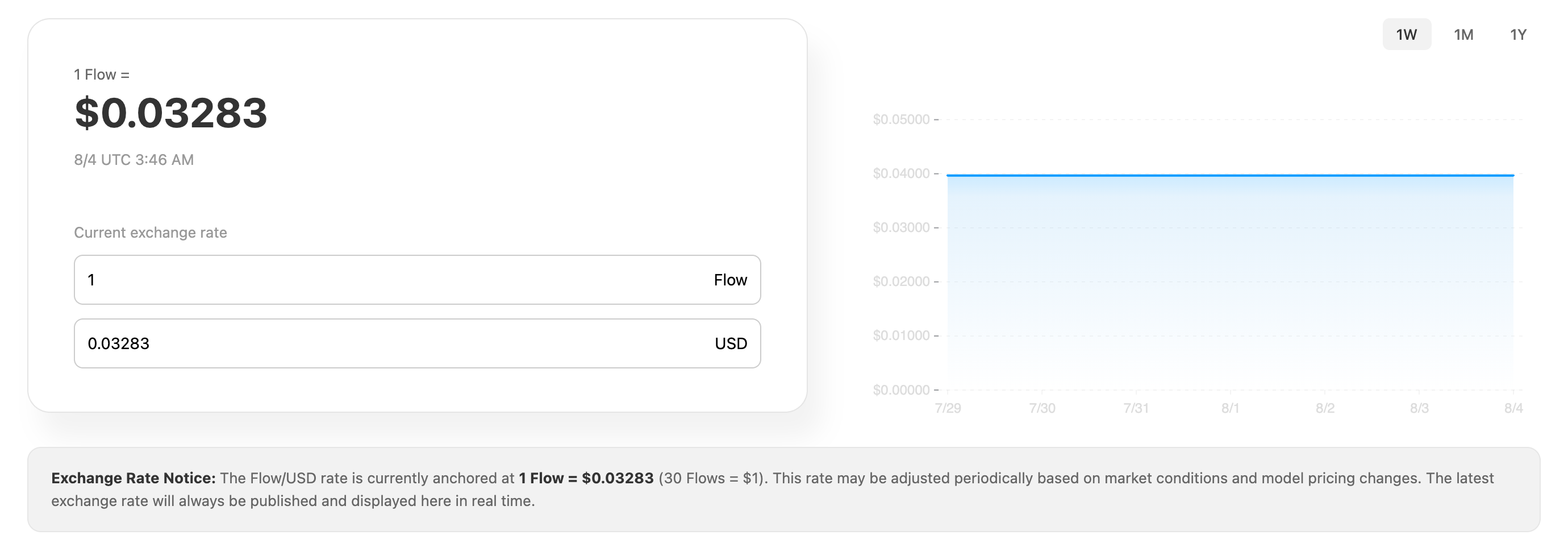
The pricing page provides a rate converter along with 1-week, 1-month, and 1-year historical charts. As of 2026-08-04, the rate is anchored at 1 Flow ≈ $0.03283 (about 30 Flows = $1).
The rate is adjusted periodically
This rate may be adjusted based on market conditions and model pricing changes, so the figure above is only a snapshot from when the screenshot was taken. The latest rate is always published in real time on the pricing page.
Abuse policy
Accounts found to be violating the 订阅计划 terms of service — through automated abuse, resource hoarding, multi-account pooling, unauthorized resale, account sharing, and similar behavior — will have their effective Flow value reduced below the standard rate, meaning each Flow is worth less in USD-equivalent terms. 请use your subscription responsibly.
Quotas and limits
Quota comparison across plans
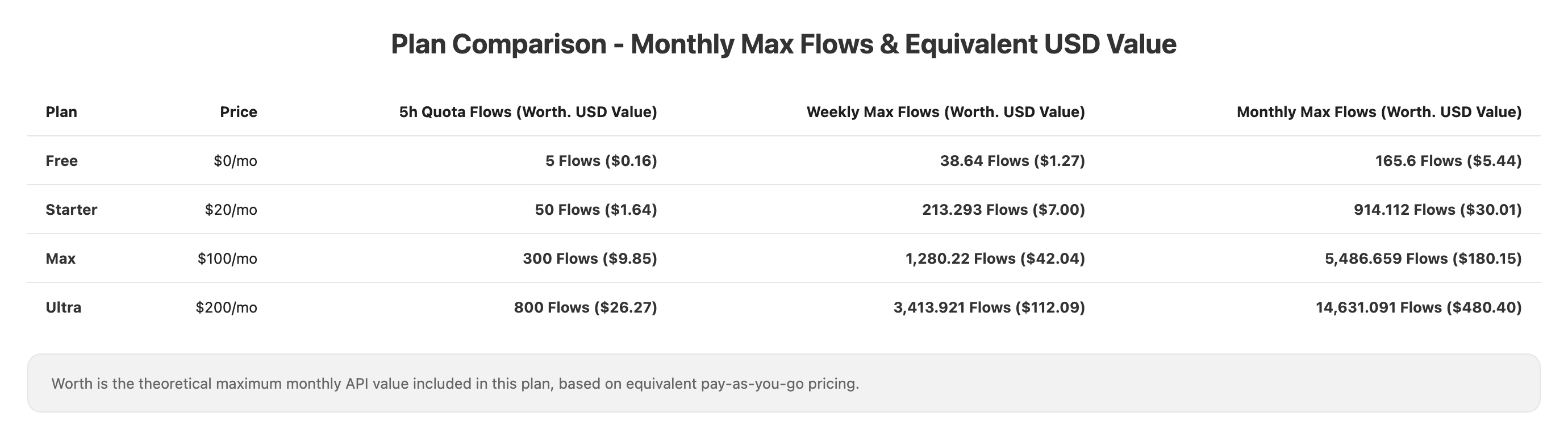
The table above is a snapshot from 2026-08-04, intended to convey the relative scale of each tier.
- Equivalent USD value (Worth) — the theoretical maximum monthly API value included in the plan, based on equivalent pay-as-you-go pricing.
- Value leverage — equivalent USD value ÷ monthly fee, showing how many times your subscription cost you get back in API value.
Defer to the pricing page
All Flow and USD figures above are calculated dynamically and move with the Flow exchange rate. Treat the live values on the pricing page as authoritative.
Bonus Flow value for Insider members
The standard Flow value applies to all regular subscribers. Early Insider members who maintain an active, uninterrupted subscription receive a higher USD-equivalent value per Flow as a loyalty reward — the same Flow stretches further.
Rate limits and quota windows
| Item | Rule |
|---|---|
| Rate limit | 10–15 RPM (requests per minute) |
| Quota window | Rolling 5-hour window, refreshed automatically |
| Weekly limit | Resets on a rolling 7-day window |
Both windows are rolling: the clock starts with your first request and resets automatically 5 hours or 7 days later. You can check remaining quota and reset times in real time on the subscription management page.
Window resets
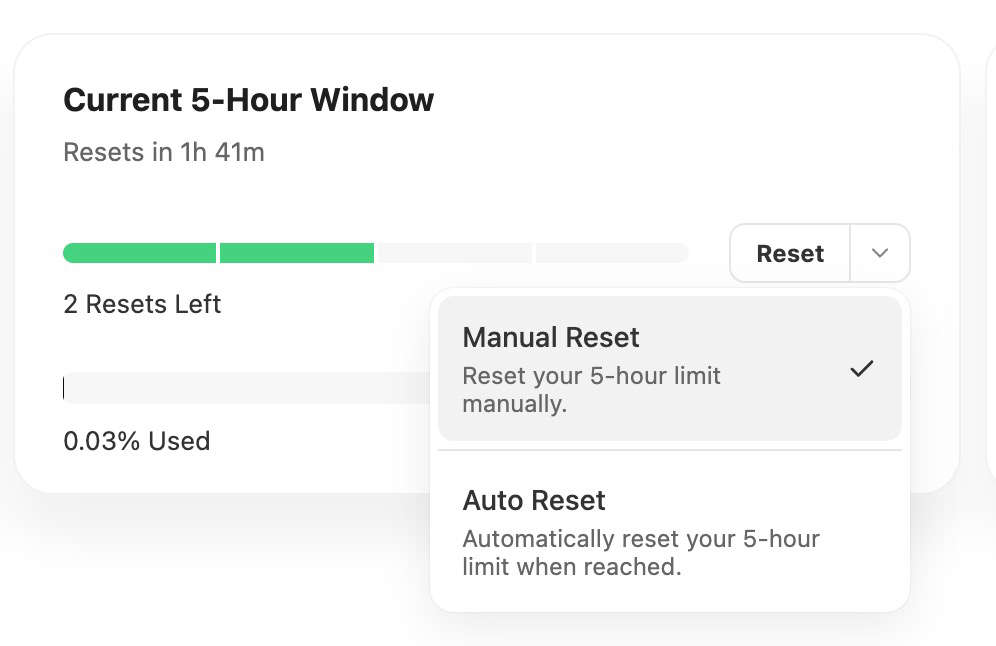
Within each billing cycle, subscribers get a set number of 5-hour window resets. When your 5-hour quota is nearly exhausted, you can reset the window manually to restore your quota immediately instead of waiting for the rolling reset.
| Plan | Bonus resets per month |
|---|---|
| Starter | 4 |
| Max | 3 |
| Ultra | 2 |
How to use it
The subscription management page shows how many resets you have left; click "Reset window" to refresh your 5-hour quota immediately. You can also enable auto-reset, which spends one reset automatically whenever your quota runs out — no manual action required.
Resets are counted per subscription cycle (for example, June 3 to July 3) and do not roll over. The number of resets per plan may change with platform policy, so treat the subscription management page as authoritative.
Usage guidelines
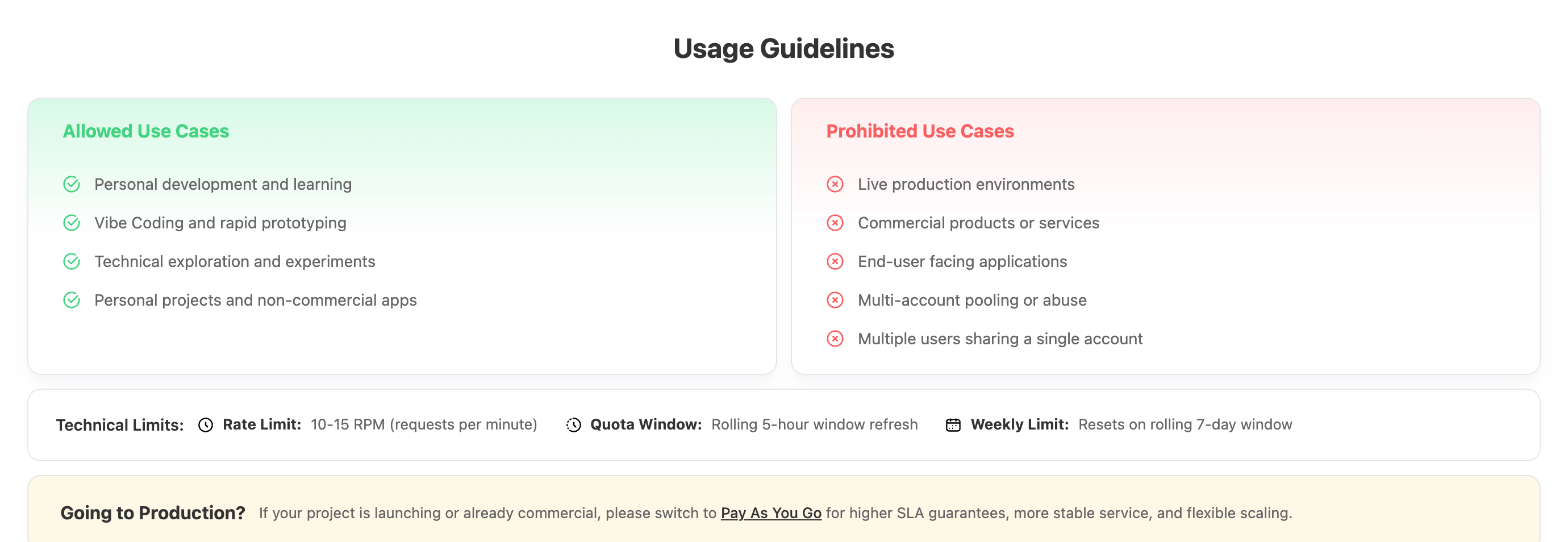
Subscription plans are designed for non-production scenarios such as personal development, learning, and Vibe Coding.
Allowed use cases
- Personal development and learning
- Vibe Coding and rapid prototyping
- Technical exploration and experiments
- Personal projects and non-commercial apps
Prohibited use cases
- Live production environments
- Commercial products or services
- End-user facing applications
- Multi-account pooling, rotation, and similar abuse
- Multiple users sharing a single account
Going to production?
If your project is launching or already commercial, switch to Pay As You Go for stronger SLA guarantees, more stable service quality, more flexible scaling, and professional commercial support.
Why choose the 订阅计划?
Key benefits
| Pain point | How subscriptions solve it |
|---|---|
| Worrying about cost while Vibe Coding | A fixed fee from $20/month, so you can code freely |
| Learning new tech is too expensive | Explore a wide range of AI models cheaply |
| Juggling accounts across platforms | One API Key for every model |
| Diverse use cases | Coding + image + video + chat, all covered |
Three core values
1. Coverage for every scenario
The 订阅计划 spans text, image generation, and video generation models. Whether you're a developer, designer, product manager, or marketer, one subscription covers the full range of Vibe Builder needs — Claude Code for coding, NanoBanana for images, and the GPT series for chat.
2. An all-star model matrix
One subscription gives you 100+ top models worldwide (the Claude, GPT, Gemini, GLM, Kimi, and MiniMax families, among others), with the newest flagships available immediately. Check the pricing page for the current list.
3. Seamless agent integration
Native support for the OpenAI, Anthropic, and Google protocols means no tool lock-in. A single subscription API Key works with Claude Code, CodeX, Open Code, OpenClaw, Cline, VS Code Copilot, and other popular community tools.
Compared with a Claude Code subscription
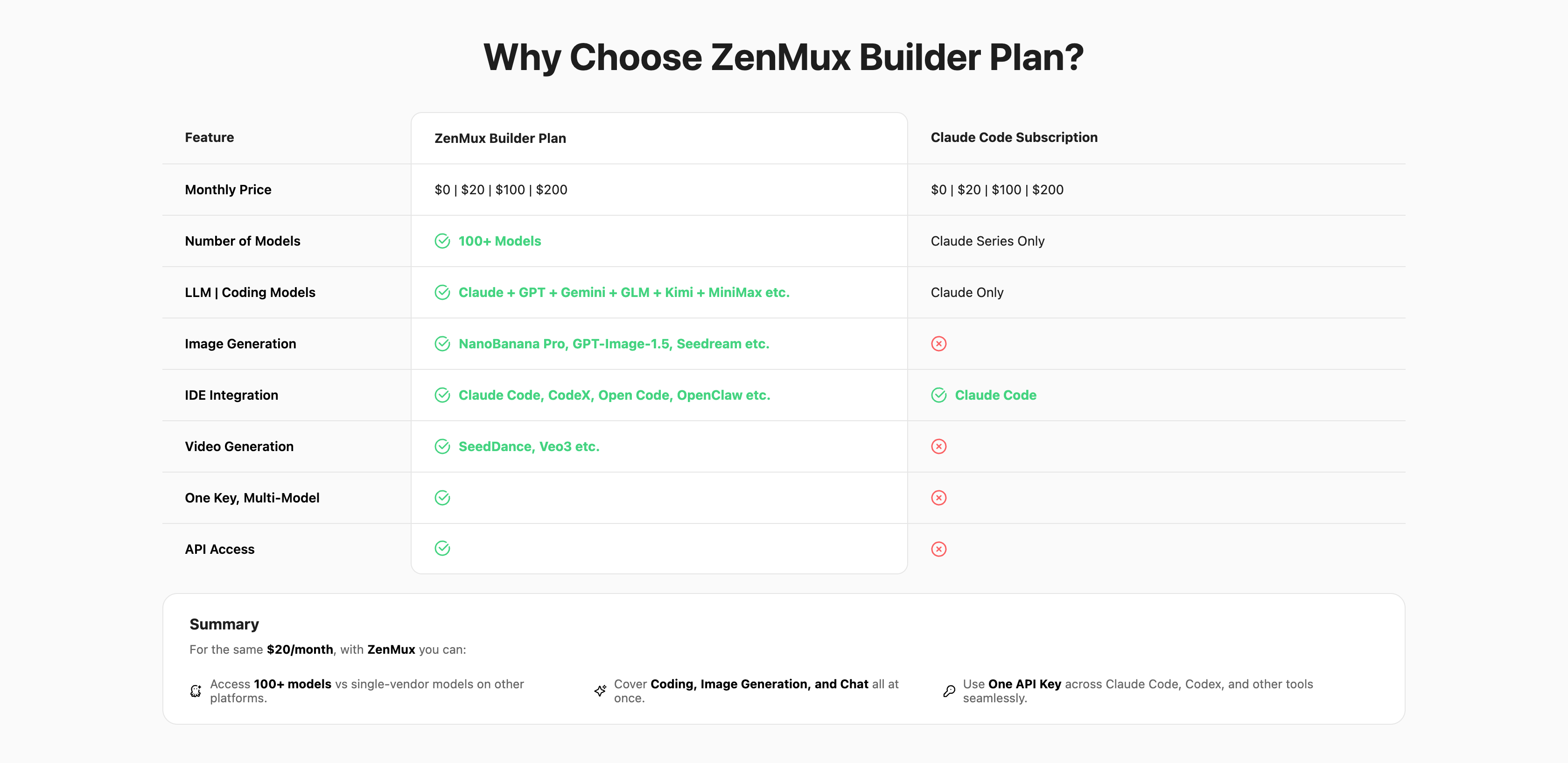
For the same $20 per month, 开桥 lets you:
- Use 100+ models instead of being limited to a single vendor
- Cover coding, image generation, video generation, and chat all at once
- Move seamlessly between Claude Code, Codex, and other tools with one API Key
How to subscribe
Step 1: Review plan details
Visit the subscription pricing page to see live pricing, quotas, and model lists for every plan.
Step 2: Choose and subscribe
- Pick the plan that fits your needs on the pricing page
- 点击Get Starter, Get Max, or Get Ultra (existing subscribers see Change Plan)
- Complete payment
Supported payment methods
Stripe credit cards and Alipay.
Step 3: Manage your subscription and get an API Key
Once subscribed, head to the subscription management page:
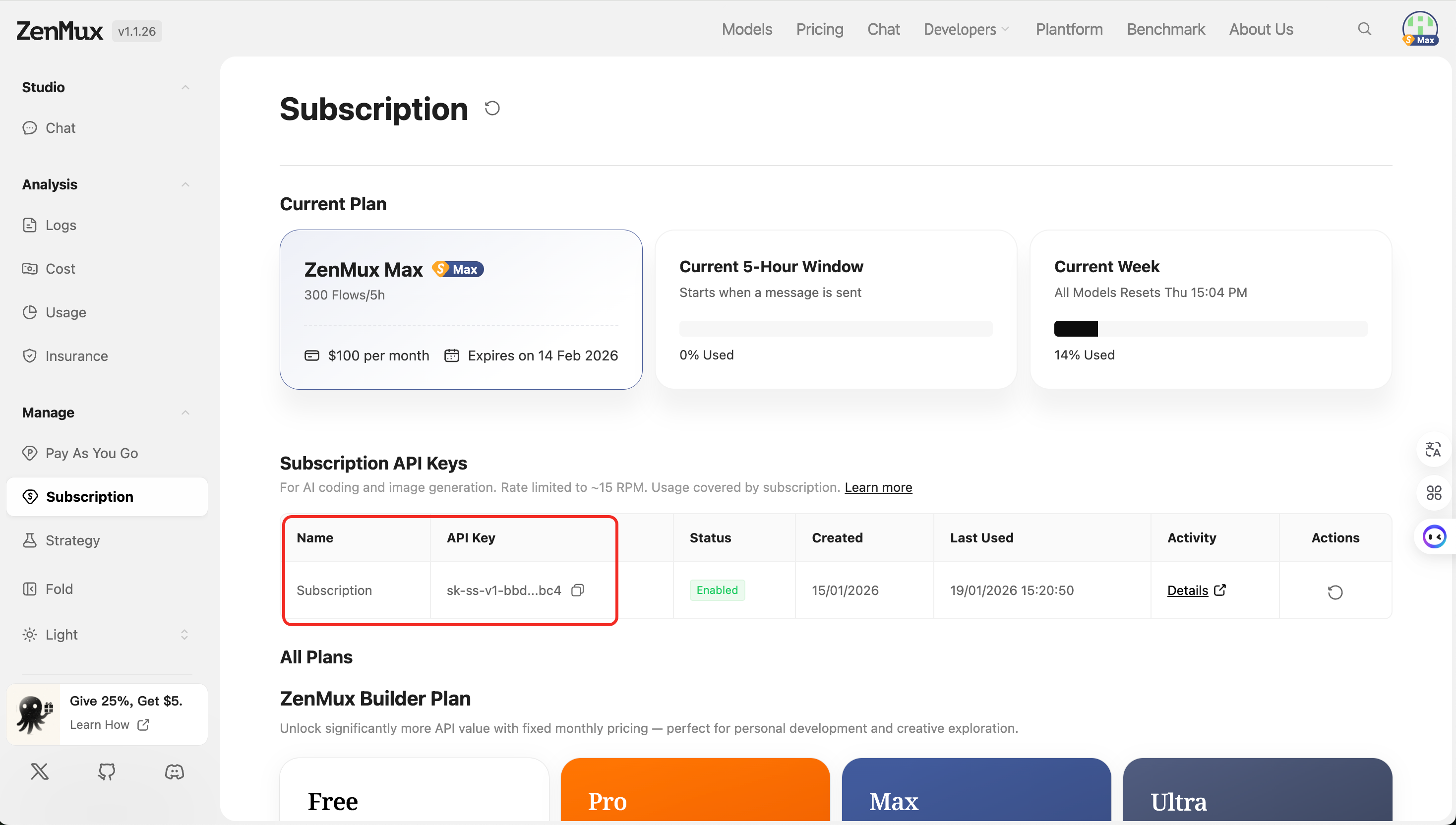
- Review usage — current 5-hour window usage and time remaining, weekly totals, and a Flow consumption breakdown
- Get a subscription API Key — create subscription-specific keys, manage and rotate existing keys, and check last-used timestamps
- Manage your subscription — view your current plan, upgrade or downgrade, and review billing history
Step 4: Use it in developer tools
Subscription API Keys work exactly like pay-as-you-go keys, supporting the OpenAI SDK, the Anthropic SDK, and direct HTTP calls.
The only difference is that you use a subscription-specific API Key (prefixed with sk-ss-v1-), and calls draw Flows from your subscription quota instead of charging your account balance.
API examples
For complete code samples, see the quickstart guide — just swap in your subscription API Key.
Integrate with mainstream tools
AI coding tools
- Claude Code integration guide - Anthropic's official CLI
- CodeX integration guide - OpenAI's official coding assistant
- Cline integration guide - VS Code AI assistant extension
- VS Code Copilot integration guide - A GitHub Copilot alternative
- Neovate integration guide - A modern AI coding tool
- OpenCode integration guide - Open-source AI coding assistant
Knowledge management and chat tools
- Cherry Studio integration guide - Desktop AI chat app
- Obsidian integration guide - AI plugin for the knowledge base tool
- Sider integration guide - Browser sidebar AI assistant
AI application platforms
- Dify integration guide - LLM application development platform
- Open WebUI integration guide - Self-hosted AI chat interface
More integrations
Additional integration guides are published regularly. If you need help, join the Discord community or contact technical support.
Extra Usage - Automatic overage switching
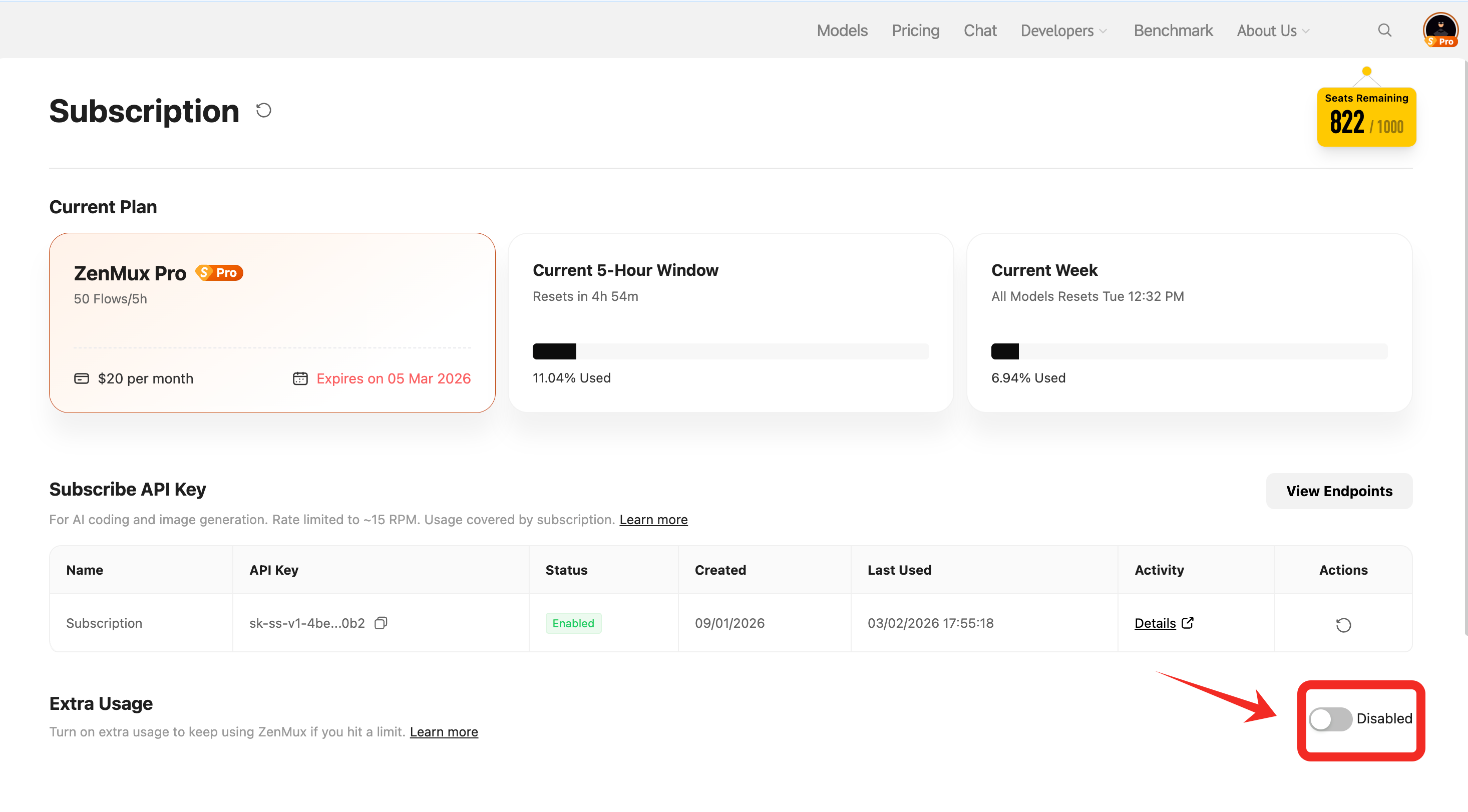
When enabled, hitting your 5-hour or weekly subscription limit automatically switches traffic to a designated pay-as-you-go API Key so your work isn't interrupted; once quota recovers, calls switch back to your subscription key.
Key benefits
- Seamless switching — falls back to pay-as-you-go automatically, with no manual key swap
- Uninterrupted workflow — your development, coding, and chat sessions keep running
- Automatic recovery — returns to subscription billing as soon as quota is restored
- Full control — enable or disable it at any time
Setup steps
Go to the subscription management page and follow these steps:
Step 1: Enable Extra Usage
Find the Extra Usage section and click the toggle on the right.
Step 2: Select a pay-as-you-go API Key
In the Select a Key dialog that appears:
- Choose an existing pay-as-you-go API Key from the dropdown
- Or click Create new key to create a new pay-as-you-go API Key
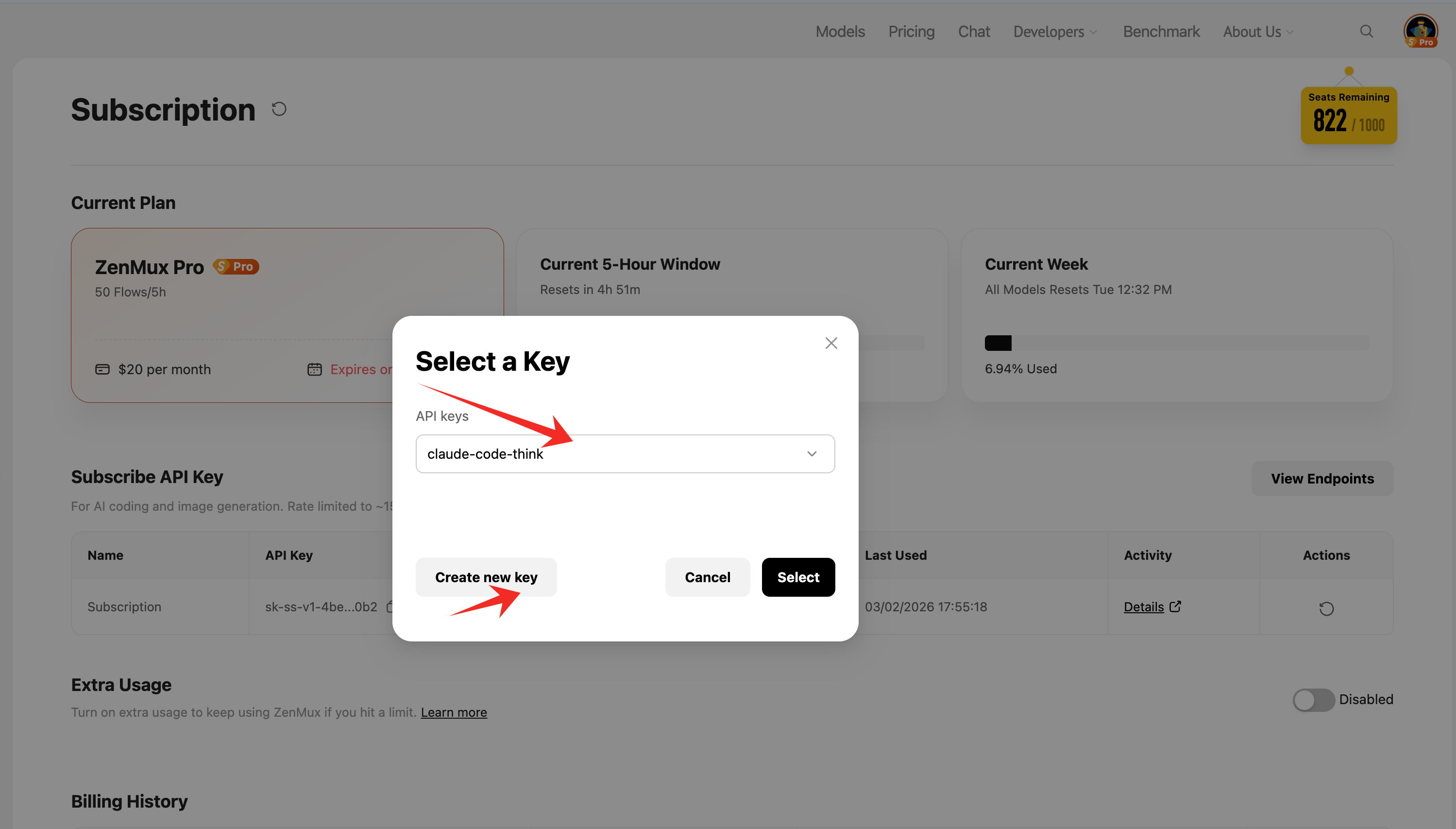
点击Select to confirm.
Step 3: Configuration complete
Once enabled, the page shows details for the selected key, including its name and secret, status, creation and last-used timestamps, the amount spent so far, and an option to switch to a different key.
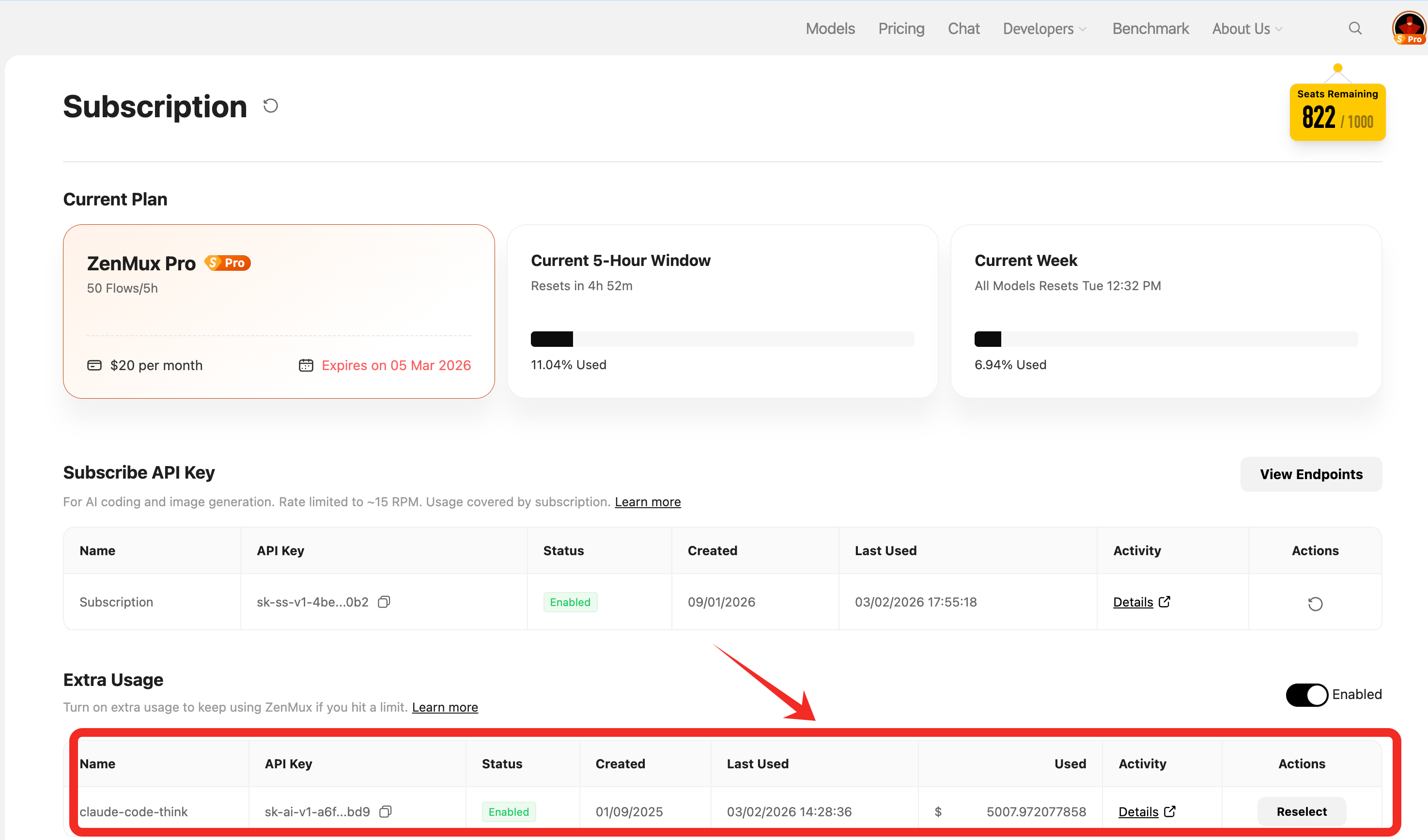
How it works
- Normal usage — subscription quota (Flows) is consumed first
- Quota exhausted — when the 5-hour or weekly window hits its limit, traffic switches to the designated pay-as-you-go API Key
- Metered billing — calls during this period first consume any available Token Packs, then are charged to your account balance
- Automatic recovery — once the subscription window resets, billing returns to your subscription
Billing reminder
With Extra Usage enabled, exhausting your subscription quota automatically switches to metered billing: available Token Packs are consumed first, then your pay-as-you-go balance. Keep that balance funded and monitor it to avoid service interruptions or unexpected charges. To switch backup keys, click Reselect.
Using subscriptions in Studio Chat
Beyond using an API Key in developer tools, you can spend subscription quota directly in 开桥 Studio Chat on the web.
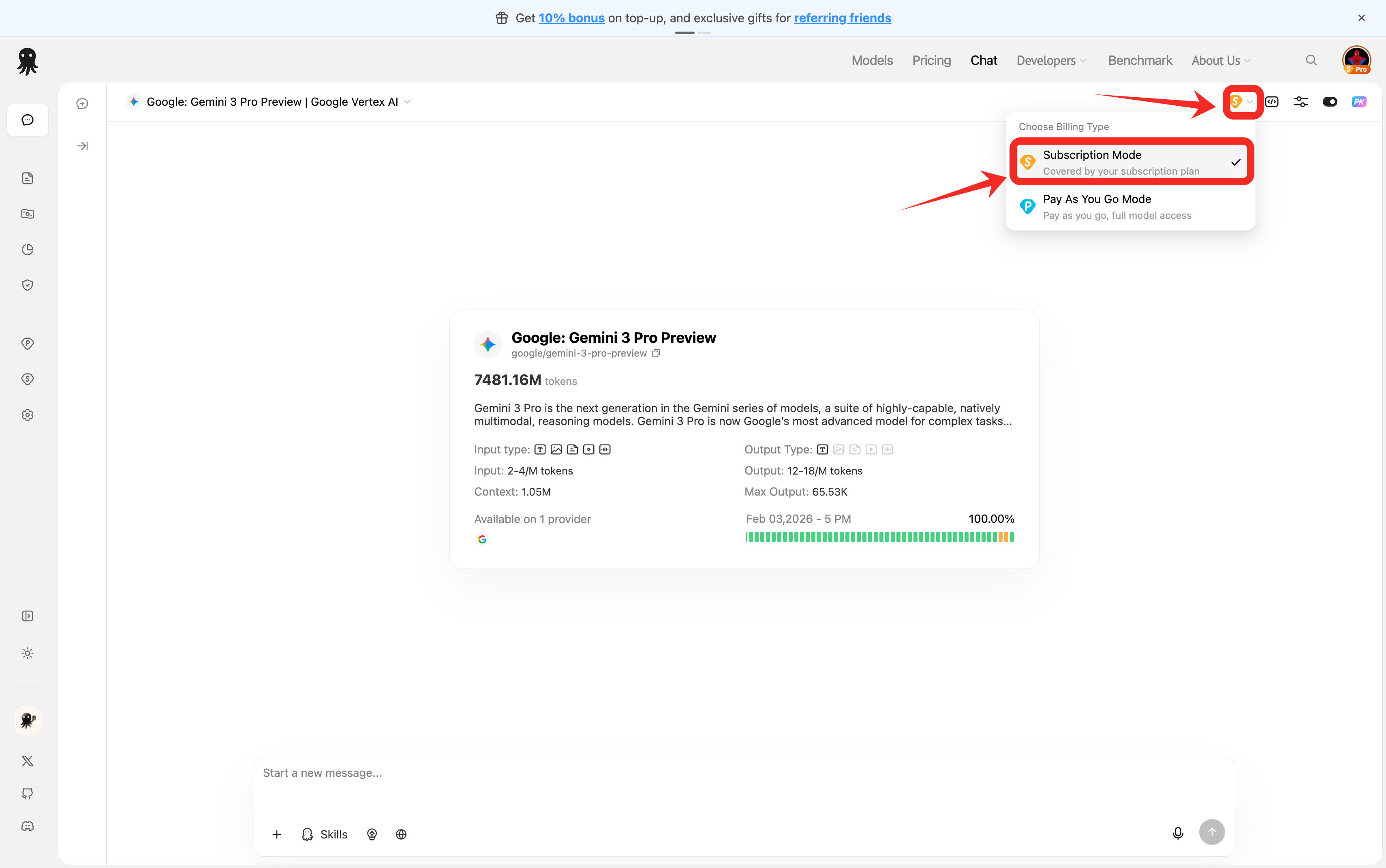
Under Billing Mode in the conversation settings, you can choose:
- Subscription — uses subscription quota (Flows) without touching your account balance
- Pay As You Go — charges your account balance based on actual usage
Switch freely
The two modes can be switched at any time and don't affect each other. For example, use Subscription for everyday development, learning, and prototyping; use Pay As You Go for production testing and commercial project validation.
Shared quota
Studio Chat and API calls share the same subscription quota pool. Conversations in Studio Chat consume subscription Flows too, so budget accordingly.
Upgrades & Downgrades
You can switch plans at any time during a subscription:
- Upgrades (for example, Starter → Max) take effect immediately, prorated against the time remaining in the current billing cycle
- Downgrades take effect at the end of the current cycle at no extra cost
Upgrade proration
When you upgrade, you only pay the price difference for the time remaining in the current cycle — not a full month's difference.
| Symbol | Meaning |
|---|---|
P_old | Current plan's monthly fee (USD) |
P_new | Target plan's monthly fee (USD) |
T | Total length of the current billing cycle (usually 1 month) |
T_rem | Time remaining until the end of the cycle |
Δ | Amount due for the upgrade |
Δ = max(0, (P_new − P_old) × (T_rem / T))In other words: amount due = plan price difference × share of the cycle remaining. If P_new ≤ P_old (not an upgrade), the amount due is 0.
Example — upgrading from Starter ($20/mo) to Max ($100/mo) with 15 days left in a 30-day cycle:
Δ = (100 − 20) × (15 / 30) = 80 × 0.5 = $40You pay only the $40 difference to upgrade; when the new cycle starts, Max bills at its normal $100/month.
Your billing cycle stays the same
Upgrading does not reset your billing cycle — your next renewal date stays exactly where it was, which avoids being double-charged by an "upgrade equals renewal" effect.
开桥 AI Insurance
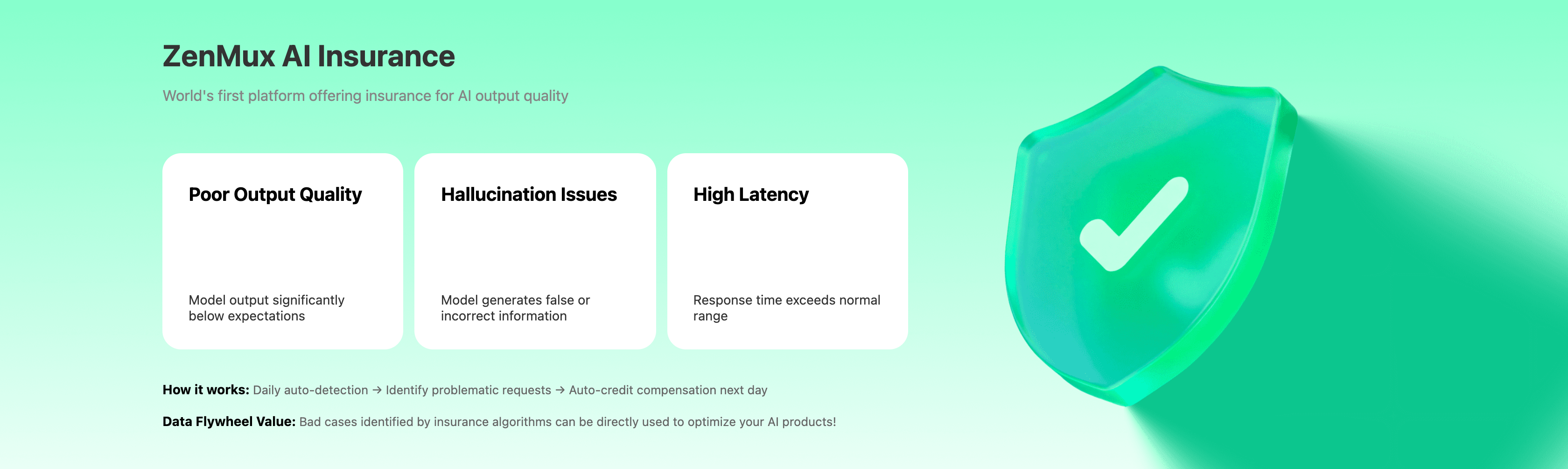
开桥 is the first platform in the industry to insure AI output quality. The following situations are detected and compensated automatically:
| Scenario | Description |
|---|---|
| Poor output quality | Model output falls significantly short of expectations |
| Hallucination | The model produces false or incorrect information |
| High latency | Response time exceeds the normal range |
How it works: daily automatic detection → problematic requests identified → credit compensation issued automatically the next day.
Data flywheel value
Bad cases surfaced by the insurance algorithms can feed directly into optimizing your own AI products.
Refunds
To request a refund, see the refund policy for eligibility, calculation methods, and the request process.
FAQ
What's the difference between subscriptions and pay-as-you-go?
| Aspect | Subscription (订阅计划) | Pay As You Go |
|---|---|---|
| Billing model | Fixed monthly fee | Charged by actual usage |
| Best for | Personal development, learning | Production, commercial apps |
| Cost predictability | High (fixed monthly fee) | Medium (varies with usage) |
| Rate limit | 10–15 RPM | Higher, configurable |
| SLA | Standard | Stronger |
| Value leverage | 1.50–2.40x | Standard API pricing |
When does the quota reset?
Both windows are rolling:
- 5-hour window — starts counting from your first request and resets every 5 hours
- Weekly limit — starts counting from your first request and resets every 7 days
You can check remaining quota and reset times in real time on the subscription management page.
Can I upgrade or downgrade my plan?
Yes, at any time from the console. Upgrades take effect immediately (prorated for the remainder of the cycle), and downgrades take effect at the end of the current billing cycle. See Upgrades & Downgrades for details.
Can I use a subscription for production?
No. Subscriptions are intended only for non-production scenarios such as personal development, learning, and Vibe Coding. For production workloads, use Pay As You Go for better SLA, stability, and scalability.
Do Studio Chat and API calls share the same quota?
Yes. Studio Chat on the web and API calls draw from the same subscription quota pool, so plan your usage accordingly.
What payment methods are supported?
Stripe credit cards and Alipay.
Can I use multiple plans at the same time?
No. Only one subscription plan can be active per account. If you need a larger quota, upgrade to Max or Ultra.
Is a specific model included in my plan?
Go to the subscription pricing page, click View on the relevant plan card, and search for the model name in the dialog. See Viewing the models included in a plan for the full walkthrough.
Next Steps
- Read the quickstart guide for detailed API usage
- Follow the best practices to wire your subscription API Key into developer tools
- Learn about Pay As You Go, the billing model for production
- Visit usage analytics to monitor subscription quota in real time
- Check cost analysis to learn how to optimize spend