

OpenQiao Skills
OpenQiao Skills is an official collection of Skills released by OpenQiao. They follow the open Skills standard, so they can be recognized and invoked by 45+ popular AI Agents. Whether you use Claude Code, Cursor, Cline, Codex, Gemini CLI, GitHub Copilot, Amp, OpenCode, Warp, Antigravity, Kimi Code CLI, Deep Agents, Firebender, or any other supported Agent, a single install lets you immediately:
- 🔍 Ask the docs: Ask anything about OpenQiao in natural language — the Agent answers based on the latest official documentation and cites its sources.
- 🛠 Configure tools: Get step-by-step guidance for connecting Cursor, Cline, Claude Code, Cherry Studio, and more to OpenQiao.
- 📊 Check usage: Look up quota remaining, subscription details, wallet balance, and per-request cost at any time.
- 💬 Submit feedback: File bugs and feature requests through conversation — GitHub Issues are created automatically.
- 📟 Watch status: Keep subscription tier, quota usage, and wallet balance always visible in the Claude Code status line.
What is a Skill?
A Skill is an extension mechanism defined by the Agent Skills open standard. Each Skill is simply a SKILL.md file with YAML metadata. Once installed:
- You can invoke it explicitly with
/skill-name. - The Agent can also trigger it automatically when it detects a matching intent (controlled by each Skill's own
descriptionfield).
Because the standard is open, the same Skill can be loaded by many different Agents (Claude Code, Cursor, Cline, Codex, Copilot, and more).
Prerequisites
- At least one supported AI Agent (see the list below)
- A OpenQiao account
- A local Node.js environment (so that
npxis available)
One-click install
Install the full Skills collection in one shot:
npx skills add OpenQiao/skillsThis launches an interactive selection UI: first pick which Skills to install, then pick which Agents should receive them.
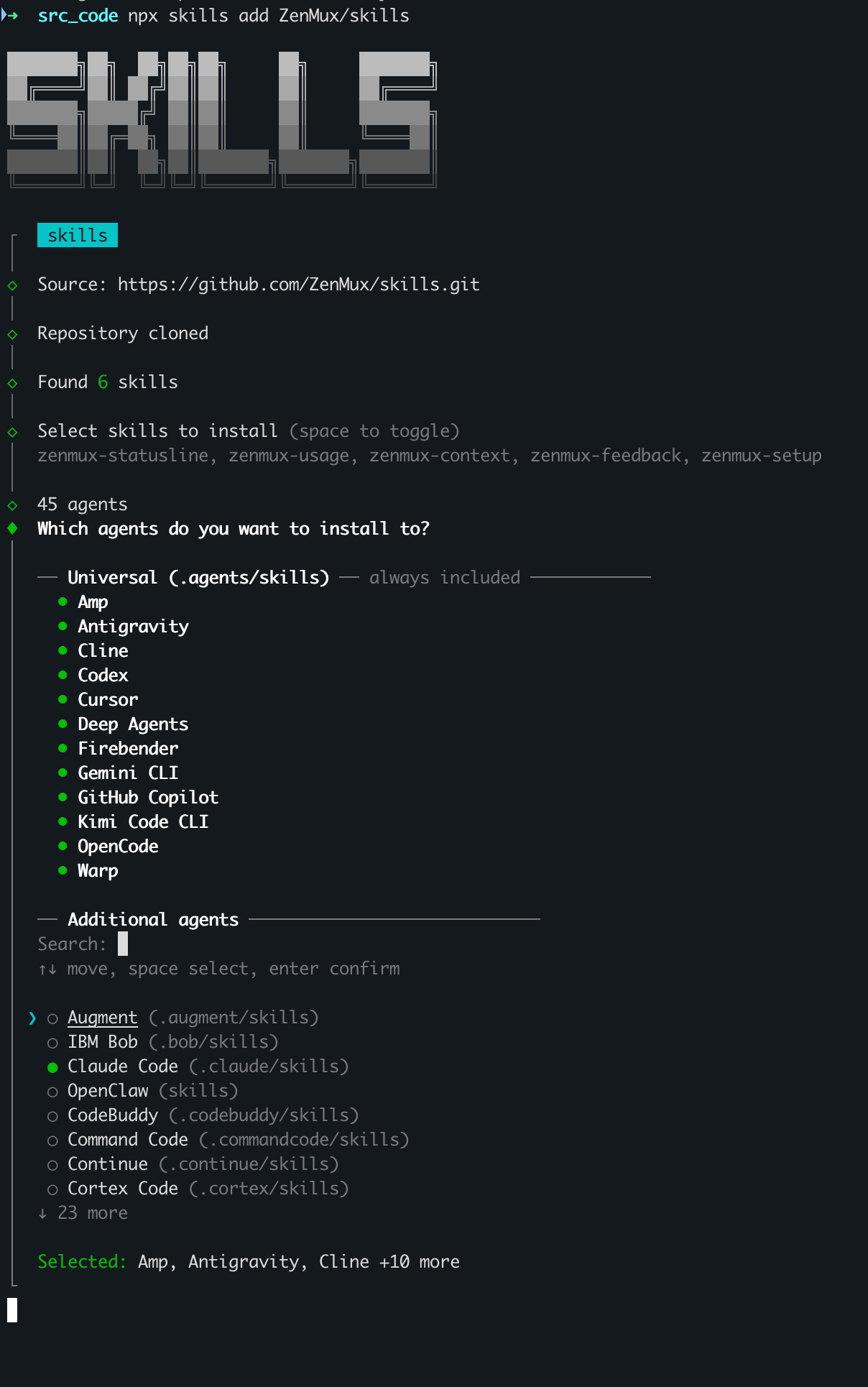
Based on your selections, the tool copies each Skill into the appropriate Agent directory (for example, Claude Code → ~/.claude/skills/; Cursor, Cline, Codex, and others that share the universal directory → ~/.agents/skills/; Augment → ~/.augment/skills/; and so on). The next time you open one of those Agents, it will recognize and be able to invoke the Skills.
You can also install Skills one at a time:
# Documentation assistant
npx skills add https://github.com/openqiao/skills --skill openqiao-context

# Integration helper
npx skills add https://github.com/openqiao/skills --skill openqiao-setup

# Usage query helper
npx skills add https://github.com/openqiao/skills --skill openqiao-usage

# Feedback submission helper
npx skills add https://github.com/openqiao/skills --skill openqiao-feedback

# Account status line (Claude Code only)
npx skills add https://github.com/openqiao/skills --skill openqiao-statusline
About where Skills are installed
Every Agent has its own directory convention, and npx skills add writes to each one automatically. Most Agents support hot reload — newly added or modified Skills take effect in the next session without a restart (exact behavior depends on the Agent you use).
Supported Agents
npx skills add supports 45+ Agents, split into two groups.
Universal (.agents/skills, shared directory, always included)
These Agents all read the same .agents/skills directory, so one install covers all of them:
| Agent | Agent | Agent |
|---|---|---|
| Amp | Antigravity | Cline |
| Codex | Cursor | Deep Agents |
| Firebender | Gemini CLI | GitHub Copilot |
| Kimi Code CLI | OpenCode | Warp |
Additional (separate directories, opt-in)
These Agents each use their own Skills directory — select them in the interactive UI to install:
- Augment (
.augment/skills) - IBM Bob (
.bob/skills) - Claude Code (
.claude/skills) - OpenClaw (
skills) - CodeBuddy (
.codebuddy/skills) - Command Code (
.commandcode/skills) - Continue (
.continue/skills) - Cortex Code (
.cortex/skills) - …and 23+ more
The CLI is the source of truth
The list of supported Agents keeps growing. For the most up-to-date roster, run npx skills add OpenQiao/skills and check the interactive selection UI.
Skills overview
| Skill | In one sentence | Example trigger |
|---|---|---|
| openqiao-context | Answers questions based on the latest OpenQiao docs | "How does OpenQiao handle model routing?" |
| openqiao-setup | Walks you through connecting a tool to OpenQiao | "Help me connect Cursor to OpenQiao" |
| openqiao-usage | Queries usage, balance, subscription, and cost | "How much Flow do I have left?" |
| openqiao-feedback | Files GitHub Issues through conversation | "I want to report a bug to OpenQiao" |
| openqiao-statusline | Shows account info in the Claude Code status line (Claude Code only) | "Set up the OpenQiao status line for me" |
openqiao-context — documentation assistant
What it does: Answers your questions based on the latest OpenQiao official documentation and cites its sources. Supports both English and Chinese.
When it triggers: Any time you ask about OpenQiao — product features, APIs, configuration, model routing, provider routing, subscription plans, pay-as-you-go, multimodal, tool calling, observability, best practices, and more — the Agent invokes it automatically.
Example conversation:
You: What's the difference between model routing and provider routing on OpenQiao?
Agent: [pulls the latest docs and answers with source links]

You: /openqiao-context Explain prompt caching
Agent: [answers based on the prompt-cache doc]
What problem it solves: You no longer need to leave your Agent to browse docs, and you don't have to worry about stale training data.
openqiao-setup — integration helper
What it does: Interactively guides you through filling in the right Base URL, API Key, and model slug so you can connect any tool or SDK to OpenQiao.
When it triggers: You say things like "how do I configure it", "what should I put in Base URL", "how to connect to OpenQiao", "set up the API key", or mention a specific tool (Cursor, Cline, Claude Code, Cherry Studio, Obsidian, Sider, Codex, Gemini CLI, opencode, and so on).
Example conversation:
You: I want Cursor to route through OpenQiao. Walk me through it.
Agent: [invokes openqiao-setup]
       Sure. First — are you on the Subscription plan or Pay As You Go?
       … (continues field by field and ends with a verification step)
What problem it solves: Avoids the usual integration pitfalls — wrong Base URL, wrong API Key type, misspelled model slugs.
openqiao-usage — usage query helper
What it does: Calls the OpenQiao Management API in real time to fetch:
- Subscription details (tier, price, billing cycle)
- Quota usage for the 5-hour / 7-day / monthly windows
- Account health status
- Flow rate
- Pay As You Go wallet balance (top-up credits + bonus credits)
- Cost, token breakdown, and latency for a specific generation
- Platform statistics (timeseries trends, model leaderboards, provider market share)
When it triggers: You ask things like "how much quota do I have left", "what's my balance", "how much did my last request cost", "check usage", "subscription details", or "Flow rate".
Prerequisite: The OPENQIAO_MANAGEMENT_KEY environment variable. Create one in the Management console.
Example conversation:
You: How much Flow have I used this week, and how much is left?
Agent: [invokes openqiao-usage]
       7-day quota: 6182 Flows used 416.11 (6.7%), 5765.89 remaining.

You: /openqiao-usage How much did the last generation cost?
Agent: [returns the generation id, token breakdown, and cost breakdown]
What problem it solves: No more quota anxiety, no more opaque balances, no more invisible per-request costs.
openqiao-feedback — feedback submission helper
What it does: Collects bugs, feature requests, and product suggestions through natural conversation, then calls the gh CLI to automatically create a GitHub Issue in the OpenQiao repo.
When it triggers: You say things like "I want to report a bug to OpenQiao", "submit some feedback", or "suggest a new feature".
Prerequisite: The GitHub CLI (gh) is installed and logged in.
Example conversation:
You: I want to report a bug — some models occasionally return 500 over the Anthropic protocol.
Agent: [invokes openqiao-feedback and collects details]
       Got it. Let me organize this:
       1. Which model specifically?
       2. How often does the error happen?
       3. Do you have a generation id I can reference?
       … (creates the Issue automatically and returns the link)
What problem it solves: No more tedious feedback loops or incomplete bug reports — you don't even have to fill out the Issue template yourself.
openqiao-statusline — account status line
Claude Code only
This Skill depends on Claude Code's statusLine mechanism and currently only works inside Claude Code. If you use a different Agent, skip this section and use openqiao-usage for interactive account queries instead.
What it does: Installs a two-line status bar at the bottom of Claude Code that shows session metrics alongside OpenQiao account info.
[claude-opus-4-7[1m]] 📁 skills | 🌿 main* | ████░░░░░░ 42% ctx | 💾 r72.0k w5.0k
⚡ OpenQiao Ultra | 🔑 Sub sk-ss-...6e6 | 5h █░░░░ 19% · 7d █░░░░ 24% | 💳 Bal $492.74
Activate once after installing
npx skills add only copies the Skill to your local machine. The first time you use it, explicitly invoke it once inside Claude Code:
/openqiao-statuslineClaude Code will write the status line script into its config, install any missing dependencies (curl, jq), and remind you to set OPENQIAO_MANAGEMENT_KEY. After that, the status bar stays in place — no need to invoke it again.
Line 1 · Session info (injected by Claude Code)
| Segment | Example | Description |
|---|---|---|
| Model | [claude-opus-4-7[1m]] | Current model slug |
| Directory | 📁 skills | Current working directory |
| Git | 🌿 main* | Branch name; * indicates uncommitted changes |
| Context | ████░░░░░░ 42% ctx | Context window usage: green <70%, yellow 70–89%, red ≥90% |
| Cache | 💾 r72.0k w5.0k | Prompt cache from the last API call: r = cache hits, w = cache writes. Hidden before the first API call |
Line 2 · OpenQiao account
| Segment | Example | Description |
|---|---|---|
| Plan | ⚡ OpenQiao Ultra | Subscription tier; a ⚠ suffix appears when the account is unhealthy |
| API Key | 🔑 Sub sk-ss-...6e6 | Key type (Sub = subscription, PAYG = pay-as-you-go) + masked key. Hidden when OPENQIAO_API_KEY is not set |
| 5-hour quota | 5h █░░░░ 19% | 5-hour rolling quota; at 100%, shows ⏳ Xh Ym countdown to reset |
| 7-day quota | 7d █░░░░ 24% | 7-day rolling quota, same color and reset logic |
| PAYG balance | 💳 Bal $492.74 | Available wallet balance (top-up + bonus); hidden when there is no PAYG balance |
Fallback behavior
| Situation | Behavior |
|---|---|
OPENQIAO_MANAGEMENT_KEY not set | Line 2 shows: ⚙ Set OPENQIAO_MANAGEMENT_KEY to display account data |
OPENQIAO_API_KEY not set | API Key segment is hidden; everything else still shows |
| API call fails | Uses the last cached value; if none, Line 2 is temporarily hidden |
Refresh frequency
| Data | Refresh interval | Source |
|---|---|---|
| Session info (model, context, cache) | Real-time | Injected into statusLine by Claude Code after every assistant response |
| Git branch | 5 seconds | Per-session cache |
| OpenQiao account (plan, quota, PAYG) | 120 seconds | Global shared cache (across sessions) |
Environment dependencies
curlandjqinstalled locally (macOS:brew install jq)- The
OPENQIAO_MANAGEMENT_KEYenvironment variable set (Management console)
Environment variables at a glance
These Skills rely on the following environment variables:
| Variable | Purpose | Where to create it |
|---|---|---|
OPENQIAO_API_KEY | General-purpose API key; openqiao-statusline uses it to detect the key type | Subscription console or PAYG console |
OPENQIAO_MANAGEMENT_KEY | Management API key; used by openqiao-usage and openqiao-statusline to fetch account data | Management console |
Add them to your shell startup file (~/.zshrc or ~/.bashrc):
export OPENQIAO_API_KEY="<your OpenQiao API Key>"
export OPENQIAO_MANAGEMENT_KEY="<your Management API Key>"
Apply the change:
source ~/.zshrc # or: source ~/.bashrcHow to invoke a Skill
Every Skill supports two invocation styles (the exact UX depends on the Agent you use):
- Automatic: When you describe an intent in natural language, the Agent decides whether to invoke the Skill based on its
description. - Explicit: Most Agents let you type
/to open the menu, or type/skill-name [arguments]directly.
Both styles work for the same request:
# Automatic
How much Flow quota do I have left?

# Explicit
/openqiao-usage 5-hour quota
What if it doesn't trigger?
If the Agent doesn't pick the Skill automatically, just invoke it explicitly with /skill-name, or rephrase your request with clearer keywords ("quota", "balance", "status line", etc.). Different Agents have different matching strategies, and explicit invocation is usually the most reliable path.
FAQ
1. Install fails / npx command not found
Make sure Node.js is installed:
node -vIf you don't see a version number, install it from nodejs.org. npx ships with Node.js — no separate install needed.
2. A Skill isn't triggering automatically
- Your phrasing may not match the keywords in the Skill's description — invoke it explicitly with
/skill-name. - You may not have selected this Agent during install — re-run
npx skills add OpenQiao/skillsand tick your current Agent in the selection UI. - The Skill may not be installed at all — run
npx skills add OpenQiao/skillsto install everything.
3. openqiao-usage / openqiao-statusline can't fetch account data
First verify the Management Key is set in your current shell:
echo $OPENQIAO_MANAGEMENT_KEYIf it prints nothing, create one in the Management console, add it to your shell startup file, and source it again.
4. openqiao-feedback fails to create an Issue
gh --version     # verify it's installed
gh auth status   # verify you're logged in
If you're not logged in, run gh auth login and follow the prompts.
5. openqiao-statusline is installed but the status bar hasn't changed
First, confirm you're using Claude Code (this Skill targets Claude Code's statusLine mechanism specifically). Beyond that, remember that npx skills add only downloads the Skill — you still need to invoke /openqiao-statusline once inside Claude Code so it can write the script into Claude Code's config and register the status line.
Related resources
- Skills repository: https://github.com/OpenQiao/skills
- Agent Skills open standard: https://agentskills.io
- Claude Code Skills official docs: https://docs.claude.com/en/docs/claude-code/skills
- OpenQiao quickstart: Quickstart
- Per-Agent integration guides: see the Best Practices section for Claude Code, Cursor, Cline, Codex, Gemini CLI, Copilot, and more
- OpenQiao consoles: