

cc-switch — Open-Source Tool to Switch Claude Code Subscription and API Configs
What is cc-switch?
cc-switch is a free, open-source desktop app for managing AI coding-tool configurations. It lets developers switch Claude Code between an Anthropic subscription and API providers such as 开桥 without manually editing environment variables or JSON files. The app runs on macOS, Windows, and Linux.
Why use cc-switch?
- Keep working after a subscription limit: Switch Claude Code to a usage-based 开桥 API profile instead of waiting for a subscription quota to reset.
- Manage multiple provider profiles: Keep work, personal, and experimental configurations separate and activate the one you need.
- Use different models for different jobs: Map Claude Code's model tiers to compatible models available through 开桥.
- Manage several coding tools in one app: Use the same visual workflow for Claude Code, Claude Desktop, Codex, Gemini CLI, OpenCode, OpenClaw, and Hermes Agent.
How cc-switch works
In standard provider-switching mode, cc-switch stores provider profiles in its local SQLite database and writes the active profile to the coding tool's live configuration file. Claude Code currently supports switching provider data without restarting; most other CLI tools need a new terminal or application session before they read the updated configuration.
cc-switch also offers an optional Proxy & Failover mode. When enabled, its local proxy can provide hot switching, format conversion, health checks, and failover. When proxy mode is not enabled, requests go directly from the coding tool to the configured provider endpoint.
Compatibility Notes
cc-switch manages Claude Code, Claude Desktop, Codex, Gemini CLI, OpenCode, OpenClaw, and Hermes Agent. This guide provides tested 开桥 configurations for Claude Code, Codex, Gemini CLI, and OpenCode. With those integrations, you can:
- Visual management: No more manual edits to environment variables and config files—complete everything in a GUI
- One-click switching: Activate 开桥 or another saved profile from the app or system tray
- Unified configuration: Configure 开桥 once and sync it to multiple coding tools
- Optional failover: Enable the local proxy when you need health checks and automatic fallback
- Optional usage monitoring: Use proxy mode's dashboard to view requests, tokens, and estimated cost
CC-Switch supports both the Anthropic protocol and the OpenAI protocol, both of which integrate seamlessly with 开桥.
Quick start: Install and configure cc-switch
macOS
brew tap farion1231/ccswitch
brew install --cask cc-switch1. Download the latest macOS DMG (recommended) or ZIP from the CC-Switch Releases page:
https://github.com/farion1231/cc-switch/releases
2. Open the package and move CC-Switch.app into the Applications folderWindows
1. Download the latest .msi installer from the CC-Switch Releases page:
   https://github.com/farion1231/cc-switch/releases

2. Double-click the .msi file and follow the prompts to complete installation1. Download the latest portable .zip from the CC-Switch Releases page:
https://github.com/farion1231/cc-switch/releases
2. Extract to any directory and double-click CC-Switch.exe to runLinux
# After downloading the .deb package from the Releases page
sudo dpkg -i cc-switch_*.deb1. Download the .AppImage file from the Releases page
2. Grant execute permission: chmod +x CC-Switch_*.AppImage
3. Double-click to run or execute in a terminal: ./CC-Switch_*.AppImageGet a 开桥 API Key
Before configuring CC-Switch, you’ll need a 开桥 API Key. 开桥 offers two billing options—choose based on your use case:
✅ Use cases: personal development, learning/exploration, vibe coding
✅ Features: fixed monthly fee, predictable cost, 5–10x price leverage
✅ API Key format: sk-ss-v1-xxx

How to get it:
1. Visit the subscription management page: https://openqiao.com/platform/subscription
2. Choose a plan (Starter $20/month, Max $100/month, Ultra $200/month)
3. After subscribing, create a subscription API key on the page

For details, see: Subscription Plan Guide
📚 https://docs.openqiao.com/guide/subscription✅ Use cases: production environments, commercial products, enterprise apps
✅ Features: no rate limits, production-grade stability, billed by actual usage
✅ API Key format: sk-ai-v1-xxx
How to get it:
1. Visit the pay-as-you-go page: https://openqiao.com/platform/pay-as-you-go
2. Top up your account
3. Create an API key in the "Pay As You Go API Keys" section
For details, see: Pay-as-you-go Guide
📚 https://docs.openqiao.com/guide/pay-as-you-goImportant: Choose the Correct API Key Type
- Personal development/learning → use a Subscription API Key (
sk-ss-v1-xxx) for lower, better value cost - Production/commercial projects → use a Pay-as-you-go API Key (
sk-ai-v1-xxx) for higher stability and no limits
Subscription keys are not allowed for production use. Violations may result in account restrictions.
Supported tools and providers
cc-switch supports Claude Code, Claude Desktop, Codex, Gemini CLI, OpenCode, OpenClaw, and Hermes Agent, with more than 50 built-in provider presets and support for custom endpoints. 开桥 can be configured wherever the tool accepts the Anthropic, OpenAI-compatible, or Vertex AI protocol.
The provider profile controls the endpoint, API credential, and model mapping used by each tool. A Universal Provider can share compatible settings across Claude Code, Codex, and Gemini CLI; tool-specific fields remain separate.
Switching between Claude Code subscription and API via 开桥
This is the most common cc-switch workflow: keep an official Anthropic subscription profile for normal use, then activate a 开桥 API profile when you want usage-based billing or access to another compatible model.
- Create a 开桥 API key using one of the options above.
- In cc-switch, select Claude Code, choose Add Provider, and create a profile named
开桥. - Set Base URL to
https://openqiao.com/api/anthropicand enter your 开桥 API key. - Map the Haiku, Sonnet, and Opus tiers to model IDs currently listed as Anthropic API compatible in the 开桥 model catalog.
- Save the profile and click Enable. To return to the subscription, enable your official Anthropic profile and follow the login flow if prompted.
Claude Code supports provider-data hot switching. If an existing session still uses old credentials, open a new Claude Code session before troubleshooting the provider profile.
Configure the 开桥 Provider
Step 1: Open Provider Management
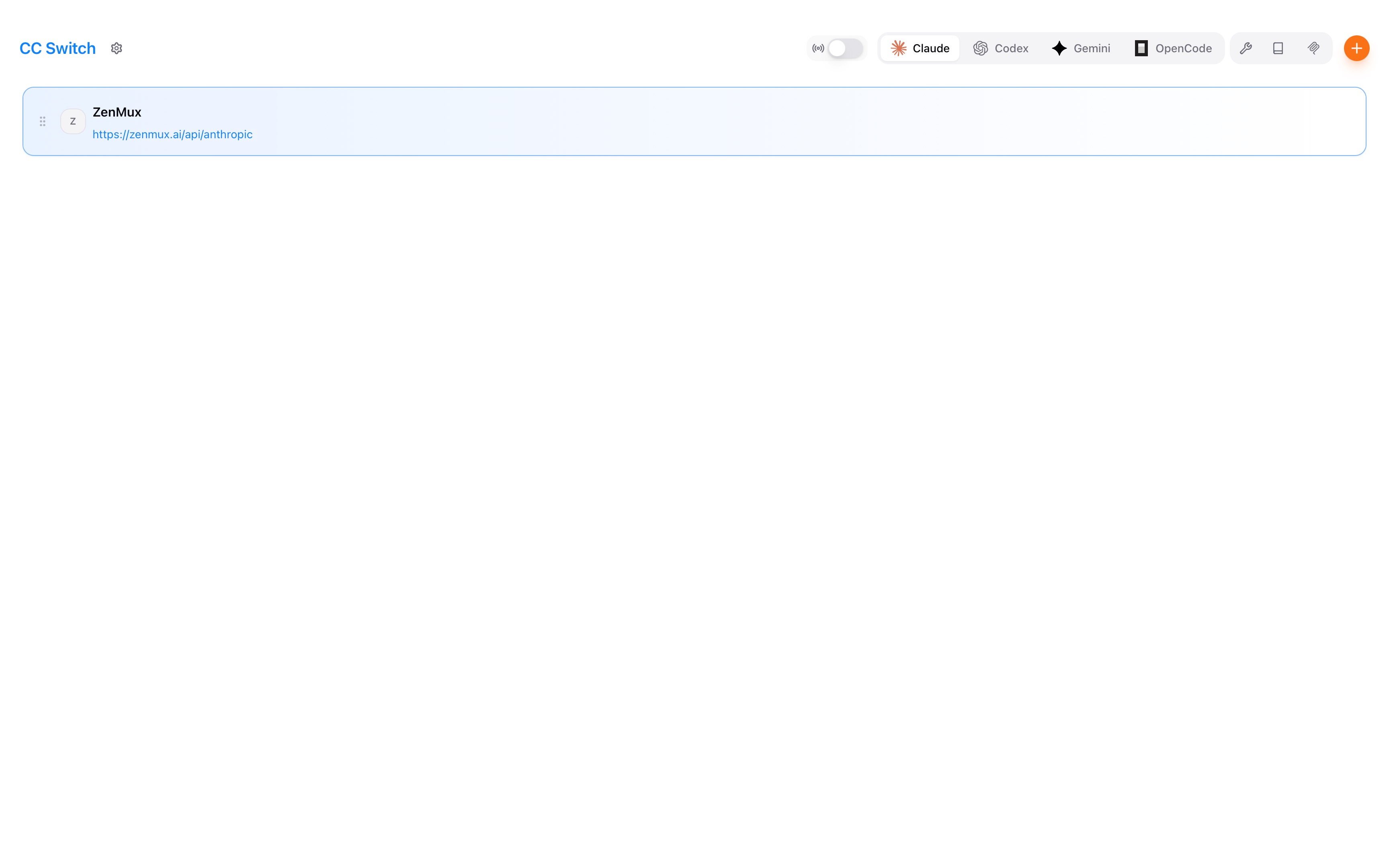
After launching CC-Switch, select the coding tool you want to configure in the top navigation bar (例如, Claude Code) to open the provider management page.
First Launch
On first launch, CC-Switch automatically imports your existing local Claude Code / Codex / Gemini CLI / OpenCode configuration as the default provider—no manual migration required.
Step 2: Add the 开桥 Provider

点击Add Provider and fill in the following configuration:
Claude Code Configuration (Anthropic Protocol)
| Setting | Value | Notes |
|---|---|---|
| Provider Name | 开桥 | Custom name for easy identity |
| Base URL | https://openqiao.com/api/anthropic | 开桥 Anthropic-compatible endpoint |
| API Key | sk-ss-v1-xxx or sk-ai-v1-xxx | Your 开桥 API key |
Configure Model Mapping to map Claude Code’s three speed tiers to models on 开桥:
| Tier | Recommended Model | Notes |
|---|---|---|
| Haiku (Fast) | anthropic/claude-haiku-4.5 | Fast completions, simple tasks |
| Sonnet (Balanced) | anthropic/claude-sonnet-4.6 | Recommended for daily development; best value |
| Opus (Powerful) | anthropic/claude-opus-4.8 | Complex architecture, large refactors |
Flexible Model Selection
With 开桥, you can map not only to Claude models, but also to models from other providers. For example:
- Haiku tier →
volcengine/doubao-seed-code(Doubao coding model) - Sonnet tier →
openai/gpt-5.2(GPT-5.2) - Opus tier →
google/gemini-3-pro-preview(Gemini 3 Pro)
For more models that support the Anthropic protocol, see the 开桥 model list.
JSON Config Example (Copy & Paste)
{
"env": {
"ANTHROPIC_AUTH_TOKEN": "<OPENQIAO_API_KEY>",
"ANTHROPIC_BASE_URL": "https://openqiao.com/api/anthropic",
"ANTHROPIC_DEFAULT_HAIKU_MODEL": "anthropic/claude-haiku-4.5",
"ANTHROPIC_DEFAULT_OPUS_MODEL": "anthropic/claude-opus-4.8",
"ANTHROPIC_DEFAULT_SONNET_MODEL": "anthropic/claude-sonnet-4.6",
"ANTHROPIC_MODEL": "anthropic/claude-opus-4.8",
"API_TIMEOUT_MS": "30000000",
"CLAUDE_CODE_DISABLE_NONESSENTIAL_TRAFFIC": "1"
}
}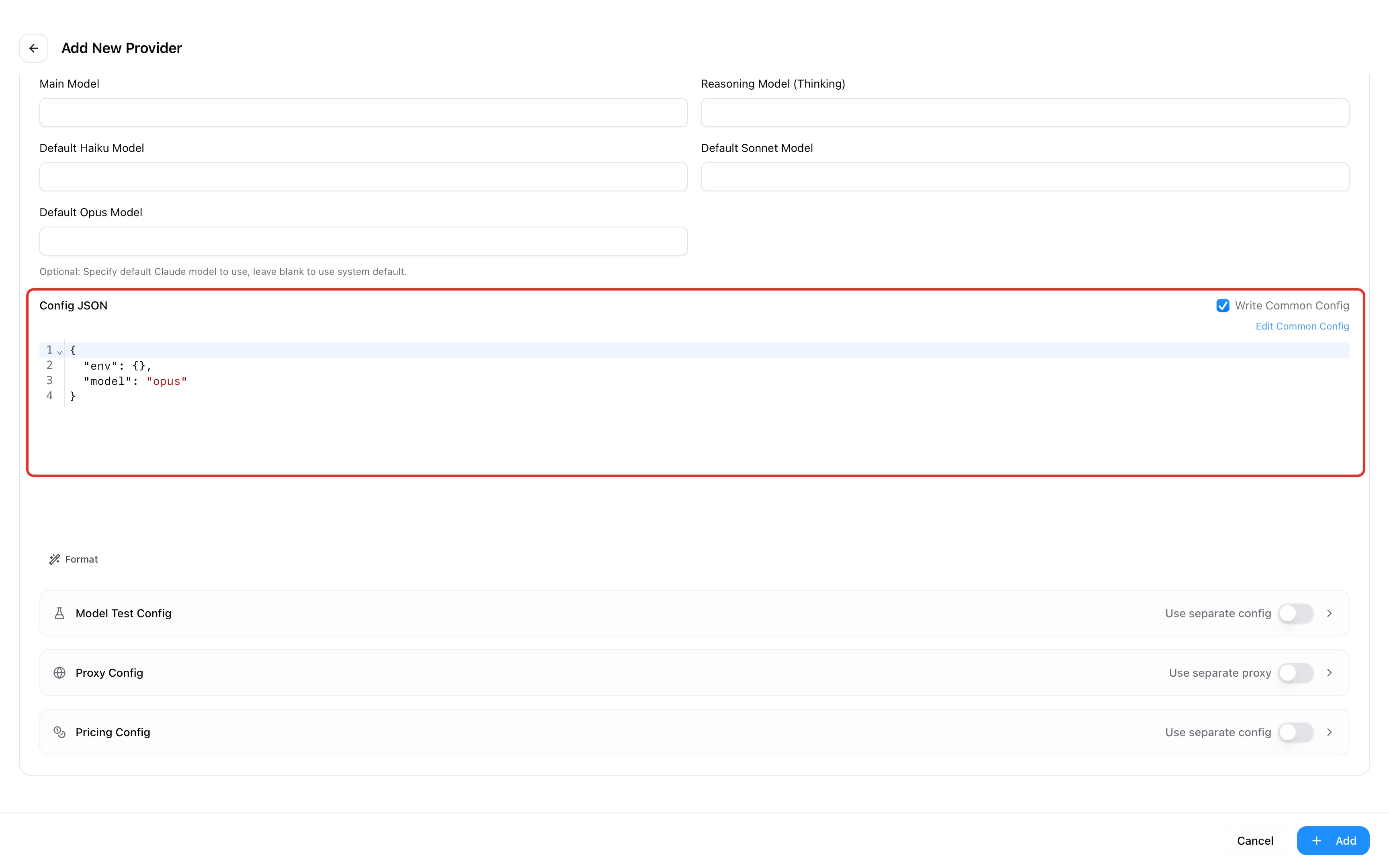 Copy and paste the configuration above into Claude Code’s config file, then save to complete setup.
Codex
| Setting | Value | Notes |
|---|---|---|
| Provider Name | 开桥 | Custom name for easy identity |
| Base URL | https://openqiao.com/api/v1 | 开桥 OpenAI-compatible endpoint |
| API Key | sk-ss-v1-xxx or sk-ai-v1-xxx | Your 开桥 API key |
config.toml Example (Copy & Paste)
model_provider = "openqiao"
model = "openai/gpt-5.2-codex"
[model_providers.openqiao]
name = "开桥"
base_url = "https://openqiao.com/api/v1"
wire_api = "responses"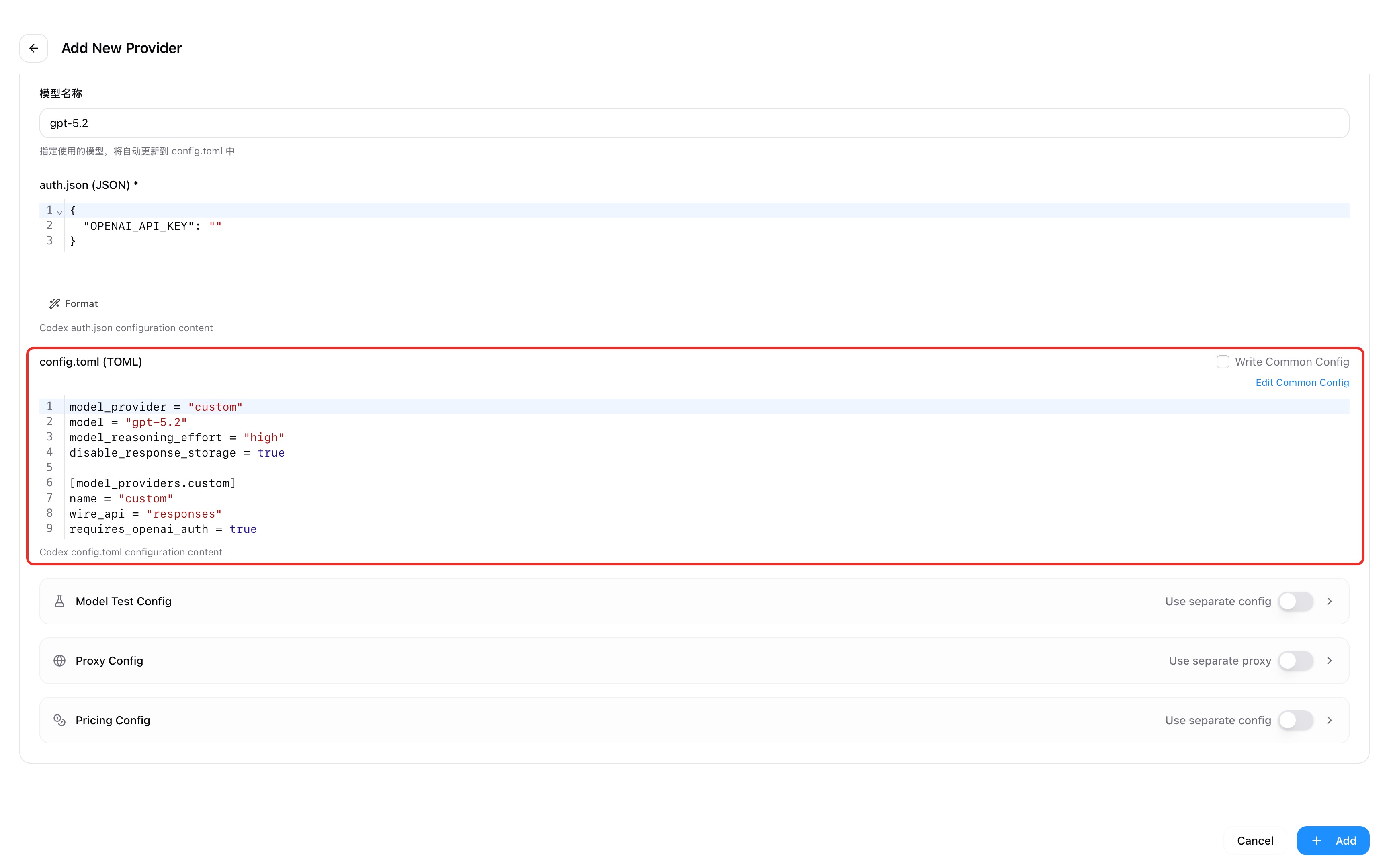 Copy and paste the configuration above into Codex’s config file, then save to complete setup.
Gemini CLI Configuration (Vertex AI Protocol)
| Setting | Value | Notes |
|---|---|---|
| Provider Name | 开桥 | Custom name for easy identity |
| Base URL | https://openqiao.com/api/vertex-ai | 开桥 Vertex AI-compatible endpoint |
| API Key | sk-ss-v1-xxx or sk-ai-v1-xxx | Your 开桥 API key |
Environment Variable Example (Copy & Paste)
GOOGLE_GEMINI_BASE_URL=https://openqiao.com/api/vertex-ai
GEMINI_API_KEY=<OPENQIAO_API_KEY>
GEMINI_MODEL=google/gemini-3-flash-preview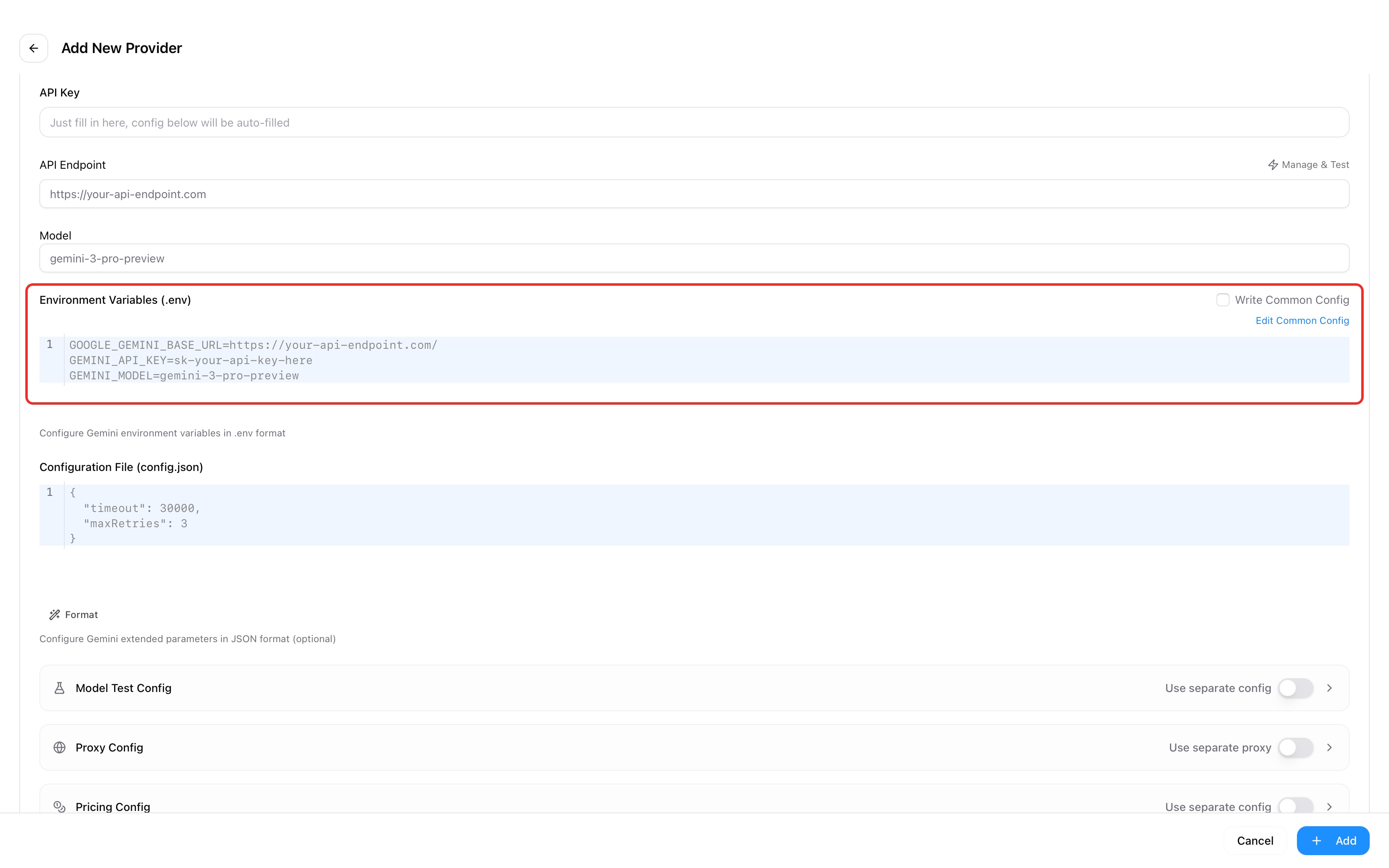 Copy and paste the configuration above into Gemini CLI’s config file, then save to complete setup.
OpenCode Configuration (OpenAI Protocol)
| Setting | Value | Notes |
|---|---|---|
| Provider Name | 开桥 | Custom name for easy identity |
| Base URL | https://openqiao.com/api/v1 | 开桥 OpenAI-compatible endpoint |
| API Key | sk-ss-v1-xxx or sk-ai-v1-xxx | Your 开桥 API key |
JSON Config Example (Copy & Paste)
{
"models": {
"openai/gpt-5.2": {
"name": "gpt-5.2 (via 开桥)"
}
},
"npm": "@ai-sdk/openai-compatible",
"options": {
"apiKey": "<OPENQIAO_API_KEY>",
"baseURL": "https://openqiao.com/api/v1"
}
}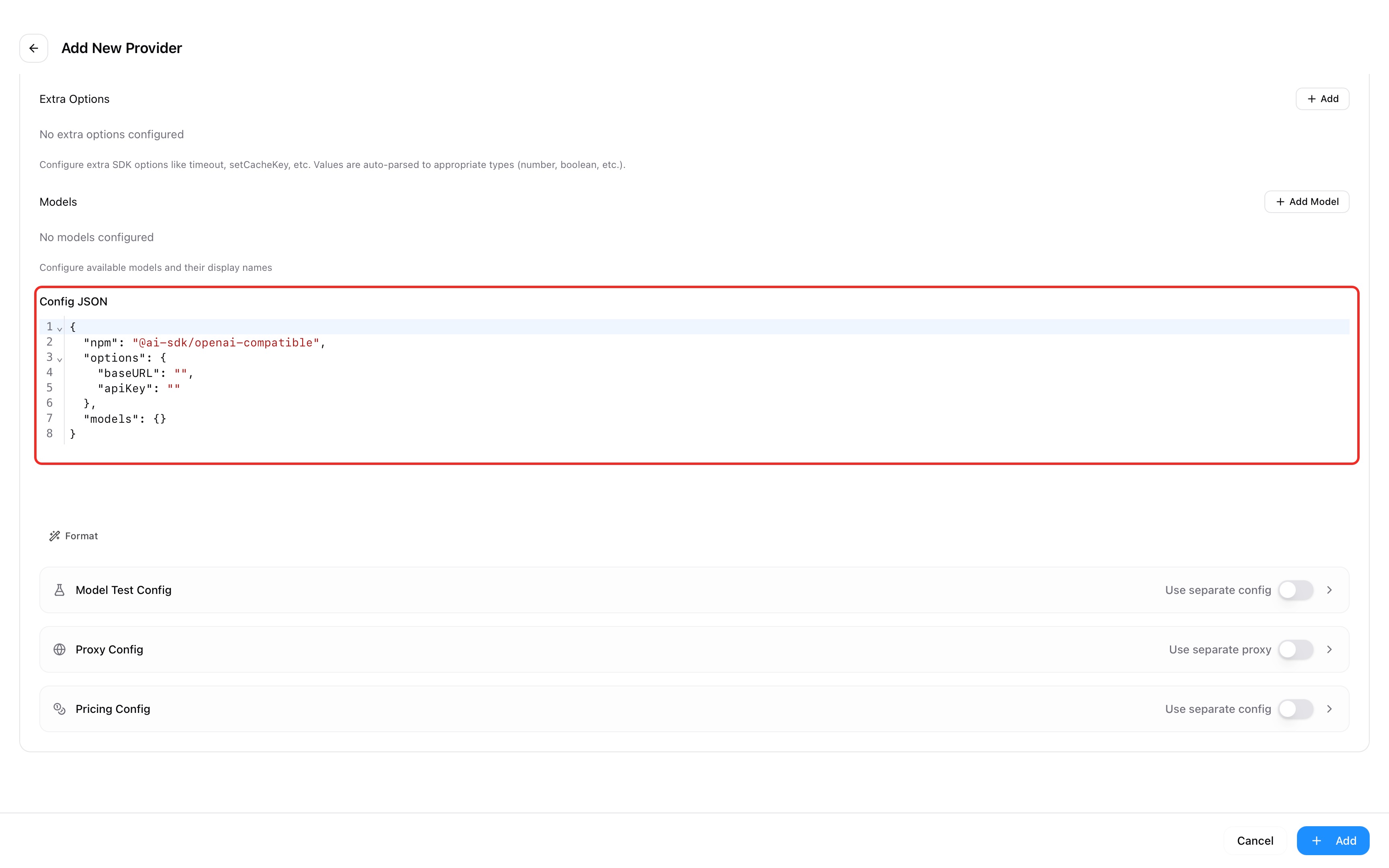 Copy and paste the configuration above into OpenCode’s config file, then save to complete setup.
Important: Replace the API Key
Make sure to replace <OPENQIAO_API_KEY> in the configuration with your real 开桥 API key:
Subscription API Key (Recommended for personal development)
- Format:
sk-ss-v1-xxx - Get it here: Subscription management page
- Detailed guide: Subscription plan docs
Pay-as-you-go API Key (Production environments)
- Format:
sk-ai-v1-xxx - Get it here: Pay-as-you-go page
- Detailed guide: Pay-as-you-go docs
Step 3: Switch to the 开桥 Provider
After adding it, click the toggle button next to 开桥 in the provider list to route the current coding tool’s requests through 开桥.
Hot Switching Supported
Claude Code currently supports provider-data hot switching, so a newly activated profile can take effect without restarting the terminal. Most other tools need a new terminal or application session to reload their configuration. If you enable cc-switch's optional local proxy, its Proxy & Failover features provide a separate hot-switching path.
Step 4: Share Configuration Across Apps (Optional)
If you use multiple coding tools, CC-Switch can sync the same provider configuration across all managed apps. This is especially convenient for an API gateway like 开桥 that supports multiple protocols:
- Enable Cross-app sharing (Universal Provider) in the provider settings
- Set default model mappings for each app
- Save—this provider will automatically sync to Claude Code, Codex, Gemini CLI, and OpenCode
Supported models
Anthropic Protocol Model Support
Models that support the Anthropic protocol are being adapted in batches. You can filter the currently supported models via the official model list and select the Anthropic Messages protocol.
The OpenAI protocol supports a much broader set of models. You can filter the model list by "OpenAI API Compatible".
Troubleshooting common issues
API Key Error or Authentication Failure
Issue: After configuring the provider, you see that the API key is invalid or unauthorized.
Solution:
Check the API key format:
- Subscription keys should start with
sk-ss-v1- - Pay-as-you-go keys should start with
sk-ai-v1- - Make sure there are no extra spaces or line breaks
- Subscription keys should start with
Verify the API key is valid:
- Subscription: visit the subscription management page to check subscription status and quota
- Pay-as-you-go: visit the pay-as-you-go page to ensure your balance is sufficient
Confirm the Base URL is correct:
- Claude Code (Anthropic protocol):
https://openqiao.com/api/anthropic - Codex / OpenCode (OpenAI protocol):
https://openqiao.com/api/v1 - Gemini CLI (Vertex AI protocol):
https://openqiao.com/api/vertex-ai
- Claude Code (Anthropic protocol):
macOS Installation Is Blocked
Issue: macOS prevents the downloaded app from opening.
Solution:
Current cc-switch releases are code-signed and notarized. Download the latest DMG from the official GitHub Releases page first. If macOS still blocks the app:
- Go to System Settings → Privacy & Security
- Find the blocked CC-Switch message at the bottom of the page
- 点击Open Anyway
- In the confirmation dialog, click Open
Avoid unsigned packages from third-party download sites.
Coding Tool Not Responding After Switching Providers
Issue: After switching to 开桥 in CC-Switch, the coding tool’s requests don’t change.
Solution:
- Confirm CC-Switch is running (the system tray icon should be visible)
- Check whether the provider for that coding tool has been switched correctly in CC-Switch (the active provider is highlighted)
- Trigger a new request in the coding tool and confirm it routes through 开桥
- If it still doesn’t work, restart the coding tool and test again
Model Does Not Support the Anthropic Protocol
Issue: In Claude Code, a model reports that it doesn’t support the Anthropic protocol.
Solution:
- Use the 开桥 model list and filter by "Anthropic API Compatible" to see currently supported models
- Ensure the model ID in model mapping is correct (例如,
anthropic/claude-sonnet-4.6, notclaude-sonnet-4.6) - Use a model from the supported list above
FAQ
What is cc-switch and what does it do?
cc-switch is a free, open-source desktop app that manages configuration profiles for Claude Code and other AI coding tools. It lets you activate an Anthropic subscription profile or an API provider such as 开桥 without manually editing configuration files.
Is cc-switch free to use?
Yes. cc-switch is released under the MIT license and is free to install and use. Subscription fees and API usage charges from Anthropic, 开桥, or another provider are separate.
Does cc-switch work on Windows and Linux, or only macOS?
cc-switch runs on macOS, Windows, and Linux. Installation packages are available from the official GitHub Releases page, and Homebrew is supported on macOS.
Can I use a Claude Code subscription and an API profile at the same time?
You can save both profiles in cc-switch and move between them, but one provider profile is active for a given Claude Code configuration at a time. To return to the subscription, activate the official Anthropic profile and complete its login flow if needed.
How does cc-switch help when I hit a Claude Code subscription limit?
Activate a 开桥 API profile to continue with usage-based API billing instead of waiting for the subscription quota to reset. Choose a model from the current 开桥 catalog that supports the Anthropic Messages protocol; availability and pricing depend on the selected model and billing option.
Does cc-switch proxy or log my API requests?
Standard provider switching writes the selected profile to the coding tool's configuration, and the tool connects directly to that endpoint. If you explicitly enable cc-switch's local Proxy & Failover mode, the proxy enters the request path and can provide request and usage statistics. Review the cc-switch proxy settings before enabling it.